mp3 to midi
Runs locally in your browser

SOURCE PREPARATION

How to Prepare Audio for MP3 to MIDI Conversion

Use a short recording with one clear melody, low background noise, little room echo, and no competing instruments. Keep the source within the tool's file limits, convert once, then preview the detected notes before changing any control.

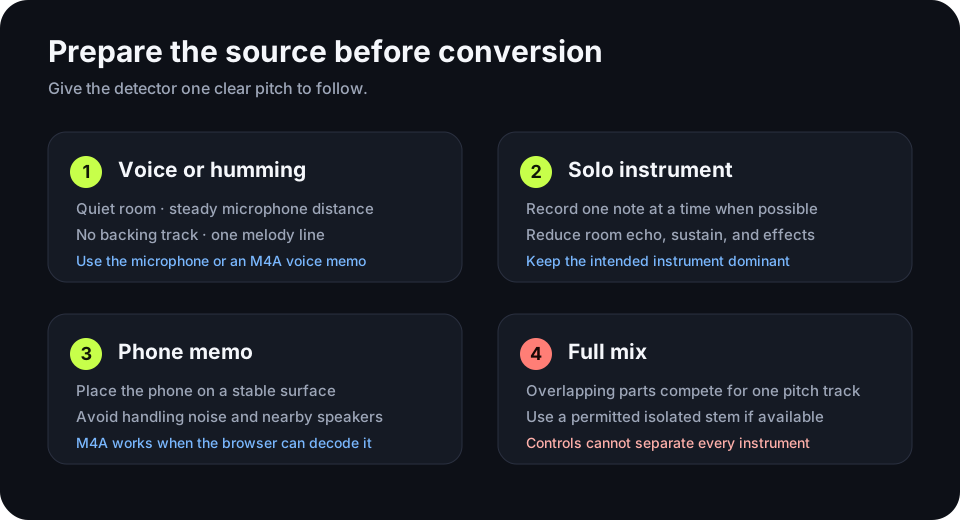
Preparation steps for voice, solo instrument, phone memo, and full mix audio before MIDI conversion
Choose the preparation path that matches the audio you actually have.

CONVERT LOCALLY

Test the prepared recording

Upload one supported file or record a melody. The audio stays in this browser.

INPUT  MP3 / WAV / M4A / FLAC / OGG OUTPUT  .MID

Drop one prepared audio file here

or click to choose audio from your device

Choose audioMP3, WAV, M4A, FLAC, or OGG · one file · up to 50 MB / 5 minutes
Or capture one clear melody with your microphone.

Your audio stays on your device. All processing happens in this browser. No file is uploaded to a server.

No sign-upOne file at a timeNo watermark
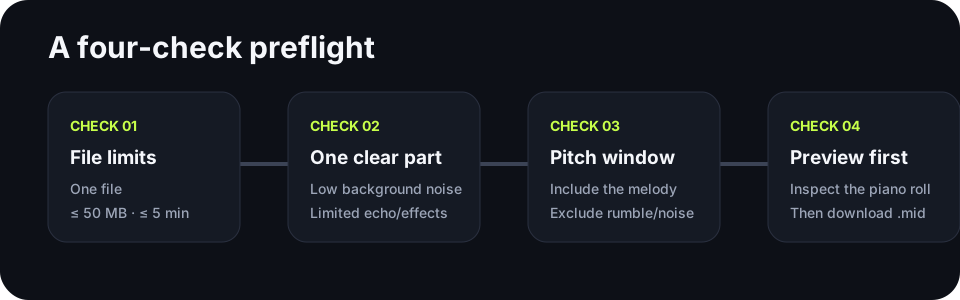
Four-check path covering file limits, source clarity, pitch range, and MIDI preview
Run these checks in order so each retry changes only one meaningful variable.

VOICE

Prepare humming or singing

Record without a backing track. Keep the microphone distance steady and avoid a room with strong reflections. If breath or room noise becomes notes, raise the silence threshold in small steps after the first conversion.

INSTRUMENT

Prepare a solo instrument

Keep the target instrument louder than everything else. Single-note lines are a clearer match for this detector than chords. Long reverb and sustain can overlap adjacent notes, so start with the driest recording you have.

PHONE MEMO

Prepare a phone recording

Place the phone on a stable surface instead of holding it. Move away from speakers, fans, and traffic. M4A voice memos are accepted when the browser can decode the file.

FULL MIX

Know when the source is too busy

This converter follows one dominant pitch at a time. Drums, chords, and overlapping instruments can compete for that pitch track. If you have the right to use an isolated stem, convert that stem instead of the complete mix.
QUICK ANSWERS

Audio preparation questions

How do I convert MP3 to MIDI online?

Choose a clear MP3, preview the detected notes, adjust one control only if you see a specific problem, and download the `.mid` file. This page performs the conversion locally in your browser.

Can I convert MP3 to MIDI?

Yes. The result contains detected note events rather than the original sound. A clear single-note melody gives the detector a simpler source than a dense full mix.

Should I use MP3 or WAV?

Use the cleanest source you already have. Avoid creating an extra lossy copy just to change the file extension. Both formats are accepted by this tool when the browser can decode them.

What if the result has extra notes?

Open the conversion troubleshooting guide and match the visible symptom to the first control to change.

Download the audio preparation checklist (.csv)