mp3 to midi
Runs locally in your browser

ABLETON LIVE HANDOFF

Audio Clip to MIDI in Ableton Live: Choose the Right Path

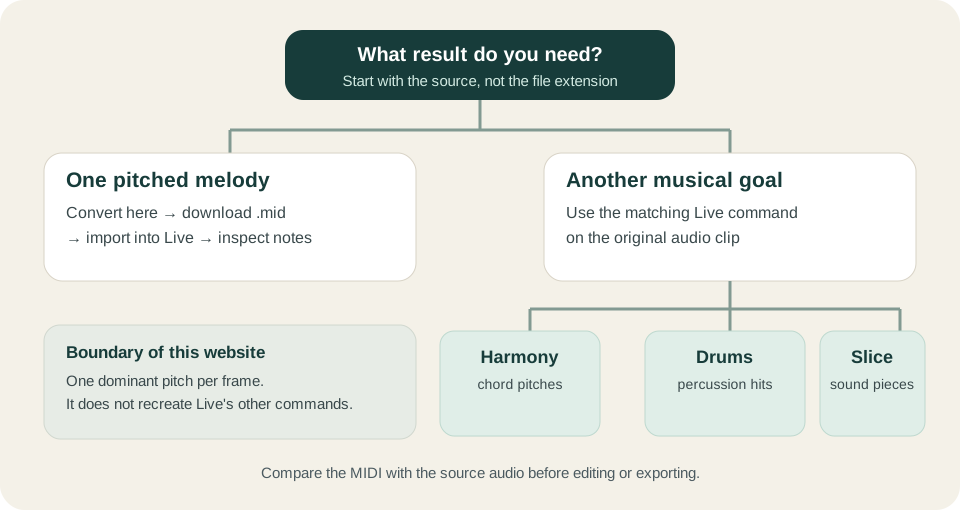
For one clear melody, convert it here and import the downloaded .mid into Live. This browser tool follows one dominant pitch at a time. If your goal is chord extraction, drum-hit extraction, or playable slices of the original sound, use Live's separate Harmony, Drums, or Slice commands on the audio clip instead. A sliced sample track and a pitch-transcribed melody are different results.

TEST YOUR FILE

Create a melody .mid for Live

Convert one clear melody here, inspect the note preview, then import the download into Live.

INPUT  MP3 / WAV / M4A / FLAC / OGG → OUTPUT  .MID

Drop one audio file here

or click to choose audio from your device

Choose audioMP3, WAV, M4A, FLAC, or OGG · one file · up to 50 MB / 5 minutes
Or record a short sound with your microphone.

Your audio stays on your device. All processing happens in this browser. No file is uploaded to a server.

No sign-upOne file at a timeNo watermark

BROWSER PATH

Convert here, then import

Choose a short, isolated melody and keep the source audio as a reference. This site's shared detector returns one pitch or no pitch for each frame. Preview the piano roll, download the .mid, then in Live use its Browser or Create → Import MIDI File…. Ableton's Live 12 file manual confirms both import routes and explains that the MIDI data becomes part of the Live Set.
LIVE PATH

Choose the command for the musical goal

Live's audio-to-MIDI manual distinguishes Melody for one pitched line, Harmony for polyphonic pitches, Drums for percussion, and Slice for sample chunks. Select the audio clip in Live, then use the Create menu or clip context menu. These are Live features; this website does not reproduce their chord, drum, or slicing behavior.

Original decision diagram separating one-melody browser MIDI export from Ableton Live Melody, Harmony, Drums, and Slice commands
Pick the output you need before converting. The two routes are not interchangeable for every source.

Choose by the result you need

Source and goalUseInspect afterward
Solo voice or single-note instrument; editable melodyThis browser converter, then import the .mid into Live; or Live's Melody commandPitch contour and note boundaries against the original audio
Chords or several pitches at onceLive's Harmony command, if available in your editionChord notes and unwanted additions
Unpitched drum rhythmLive's Drums command, if available in your editionHit positions and kit mapping
Replay the original audio as separate piecesLive's Slice commandSlice boundaries and sample playback; these notes trigger slices, not transcribed pitches

This is an original decision sheet combining the documented Live command purposes with this site's code-checked one-pitch-per-frame limit. Check your Live edition for command availability; this page does not claim a universal edition list. Download the workflow checklist (.csv).

AFTER DOWNLOAD

Place the file in the intended Live view

In Arrangement View, Live's Import MIDI File command inserts at the Insert Marker. In Session View, it inserts in the selected clip slot, according to Ableton's manual. Put the marker or selection where you want the melody before importing. Keep the original audio nearby so you can compare timing and pitch after import.

AVOID A FALSE COMPARISON

Separate the three kinds of output

An audio clip is recorded sound. This website's .mid contains detected note events and does not include the original sound. Live's Slice route creates MIDI notes that trigger pieces of the source audio; Live's Melody, Harmony, and Drums routes extract musical information. If a MIDI clip plays silently, check that its track has an instrument before judging the conversion. The DAW import checklist covers that general signal path.

QUICK ANSWERS

Ableton audio-to-MIDI questions

How do I turn an MP3 melody into a MIDI clip in Live?

Convert the solo melody above, download the .mid, then use Live's Browser or Create → Import MIDI File…. Preview notes against the original audio before editing.

Is Slice to New MIDI Track the same as pitch transcription?

No. Ableton says Slice divides the audio into samples triggered by MIDI notes; it does not analyze the clip's musical pitches the way its Convert commands do.

Can this website extract the chords in a Live audio clip?

No. Its detector chooses one dominant pitch per analysis frame. Live's separate Harmony command is designed for polyphonic input; check its result in Live.

Why is my imported MIDI clip silent?

MIDI notes need an instrument to make sound. Check the destination track and its instrument, then compare note events with the source recording.