CURRENT DETECTOR
One pitch estimate per frame
The current front-end pitch function returns one frequency or no frequency for each analysis frame. It does not emit a chord or several simultaneous pitch values.
KNOW THE SOURCE LIMIT
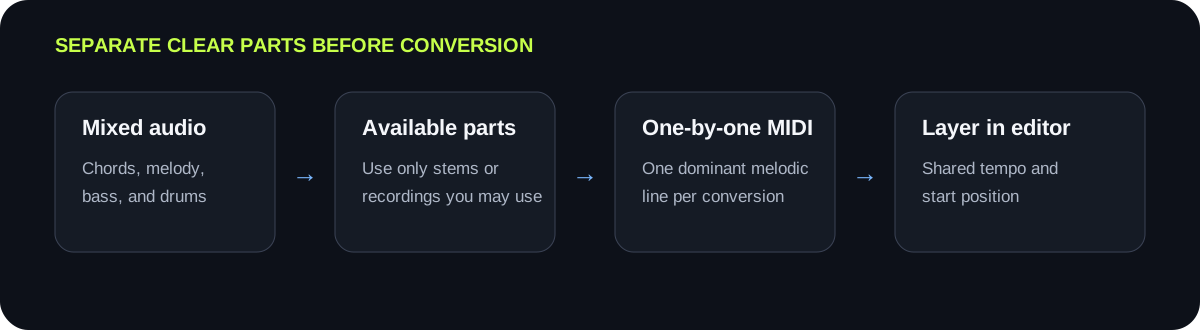
Polyphonic audio contains simultaneous pitches, such as a chord or several instruments playing together. This browser tool follows one dominant pitch at a time, so it is suited to a clear single-note melody rather than reliable chord separation. For overlapping parts, isolate one part or stem, convert each clean line separately, then combine the MIDI tracks in your editor.
TEST A CLEAR PART
Use an isolated vocal or instrument line with one dominant note at a time. Compare the detected-note preview before downloading.
INPUT MP3 / WAV / M4A / FLAC / OGG → OUTPUT .MID
or click to choose audio from your device
MP3, WAV, M4A, FLAC, or OGG · one file · up to 50 MB / 5 minutesRESULT
Your audio stays on your device. All processing happens in this browser. No file is uploaded to a server.
| Source | What reaches the detector | Best first action | Observable stop condition |
|---|---|---|---|
| Solo voice or instrument | One main pitch with harmonics | Convert directly; narrow the pitch range if needed | The preview follows the intended melodic contour |
| Single instrument playing chords | Several fundamentals and harmonics at once | Use a separate melodic line if one is available | Only one intended note dominates each moment |
| Vocal over accompaniment | Voice, instruments, and percussion overlap | Use an available vocal stem or isolated recording | The accompaniment is no longer creating note changes |
| Full band mix | Many simultaneous pitched and unpitched events | Separate only the parts you are permitted to process | Each test file contains one clear line |
| Several isolated melodic stems | One main pitch in each file | Convert each stem separately | Each preview is stable before MIDI tracks are combined |
CURRENT DETECTOR
The current front-end pitch function returns one frequency or no frequency for each analysis frame. It does not emit a chord or several simultaneous pitch values.
HARMONICS
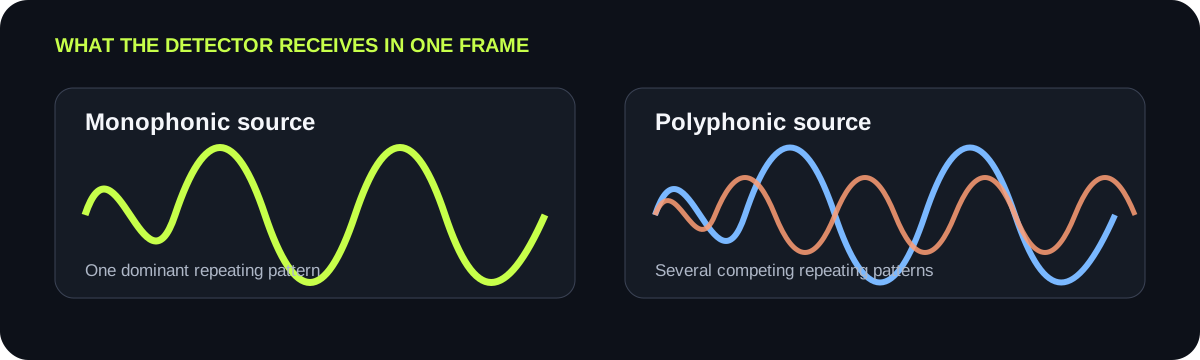
A single sung or played note includes a fundamental and harmonics. With several notes together, the detector must distinguish multiple overlapping families, which this tool does not attempt.
CONTROLS
Threshold, pitch range, and minimum note can remove unwanted events. They cannot recover every simultaneous note from a mixed chord.
WORKFLOW
When clean individual parts are available, convert them one at a time. Import the resulting MIDI files onto separate instrument tracks and align them to the same timeline.
QUICK ANSWERS
It can produce a MIDI line from the dominant pitch it detects, but it does not identify every simultaneous note in a chord. Do not treat the result as a reliable chord transcription.
Monophonic audio has one intended note at a time. Polyphonic audio has multiple simultaneous notes, as in chords or overlapping instrumental parts.
It can exclude frequencies outside the selected range, but overlapping instruments and harmonics inside that range remain mixed. It is a filter, not source separation.
A full mix can be tested, but this detector is designed around one dominant melodic pitch. A clean solo recording or an isolated permitted stem gives a more interpretable preview.
Import each file onto its own instrument track in the same music editor, set a shared tempo and start point, then inspect alignment before editing notes.