ORIGINAL FIRST
Avoid unnecessary transcoding
If the original opens, use it. A new container or extension does not make a noisy recording clearer, separate instruments, or restore detail removed from an earlier lossy copy.
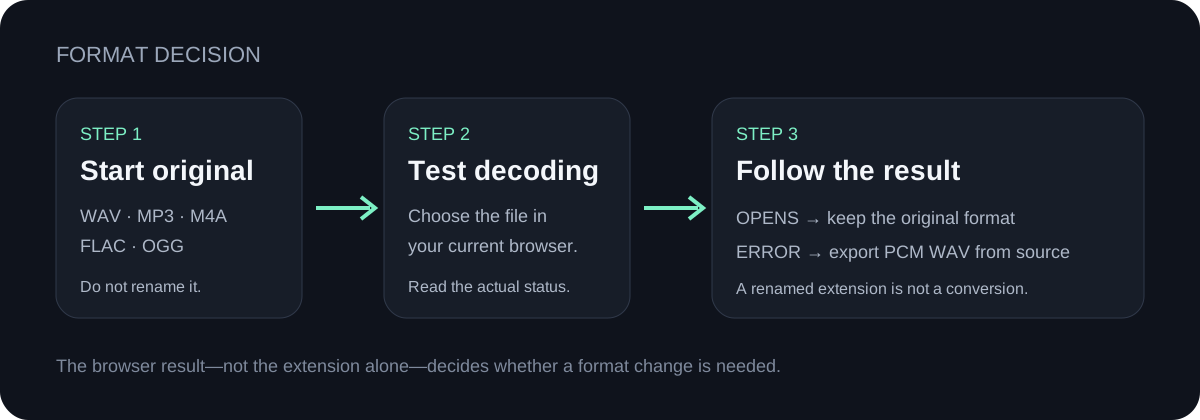
FORMAT DECISION
Use the cleanest original file you already have. Do not turn an MP3 into WAV and expect missing audio detail to return. If your browser cannot decode the original, use a standard PCM WAV exported from the original recording or project as the compatibility fallback.
CONVERT LOCALLY
Choose one supported audio file. Nothing is uploaded.
INPUT MP3 / WAV / M4A / FLAC / OGG → OUTPUT .MID
or click to choose audio from your device
MP3, WAV, M4A, FLAC, or OGG · one file · up to 50 MB / 5 minutesRESULT
Your audio stays on your device. All processing happens in this browser. No file is uploaded to a server.
| Starting file | Use it directly when | Change format only when | What not to assume |
|---|---|---|---|
| WAV | The browser decodes it and it is within the visible limits. | A WAV encoding is unsupported; export standard PCM WAV from the original source. | A WAV extension alone does not prove the recording is cleaner. |
| MP3 | It is the cleanest original available and opens successfully. | The browser reports a decode error and you still have the original project or recording. | Saving the MP3 as WAV cannot restore audio already removed by compression. |
| M4A | A phone memo or export opens in the current browser. | The current browser cannot decode that specific file. | The same extension does not guarantee identical encoding in every file. |
| FLAC | The browser decodes it without an error. | Compatibility blocks the file; export from the original source to PCM WAV. | Lossless storage does not remove noise, reverb, chords, or overlapping instruments. |
| OGG | The browser decodes the selected file. | The file fails to open in the current browser. | Changing the container does not simplify a dense musical mix. |
ORIGINAL FIRST
If the original opens, use it. A new container or extension does not make a noisy recording clearer, separate instruments, or restore detail removed from an earlier lossy copy.
COMPATIBILITY
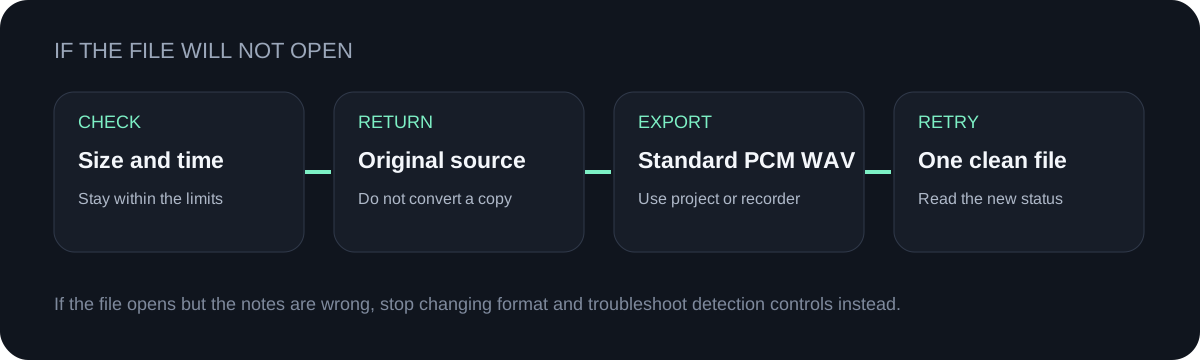
If a supported extension still fails to decode, return to the original recording or project and export a standard PCM WAV. Renaming the extension is not a conversion.
SOURCE QUALITY
The detector follows one dominant pitch at a time. A clean solo melody is a simpler input than drums, chords, room echo, and overlapping instruments in any file format.
VISIBLE LIMITS
This page accepts one file at a time, up to 50 MB and 5 minutes. A shorter excerpt also makes it easier to inspect the note preview before downloading.
QUICK ANSWERS
Yes. Choose the WAV above, let the browser decode it, preview the detected note events, and download the `.mid` file.
This page runs the conversion in your browser and does not upload the audio. “Online” describes access through a webpage; it does not require server-side file processing.
Not when the MP3 already opens. Converting that MP3 to WAV changes storage format but cannot restore detail missing from the MP3 source.
The extension may contain an encoding that the current browser cannot decode. Try the original in another supported browser, or export standard PCM WAV from the original recording or project.
That is a detection problem rather than a format error. Use the result troubleshooting guide and change one control at a time.