mp3 to midi
Runs locally in your browser

KEY-METADATA LIMIT

Audio to MIDI Key Signature: Does This Export Include One?

No. This converter exports detected MIDI note pitches, not a detected musical key or a key-signature event. The current file writer has no key-signature meta-event. If a notation editor shows a default key after import, that display is not proof that the recording was analyzed for a key. Use the source audio or a known score to set the key signature in your editor, then check the displayed notes.

TEST YOUR FILE

Convert notes, then set notation

The piano-roll preview shows detected pitches. It does not identify a musical key.

INPUT  MP3 / WAV / M4A / FLAC / OGG → OUTPUT  .MID

Drop one audio file here

or click to choose audio from your device

Choose audioMP3, WAV, M4A, FLAC, or OGG · one file · up to 50 MB / 5 minutes
Or record a short sound with your microphone.

Your audio stays on your device. All processing happens in this browser. No file is uploaded to a server.

No sign-upOne file at a timeNo watermark

THIS WRITER

Pitch data is not key metadata

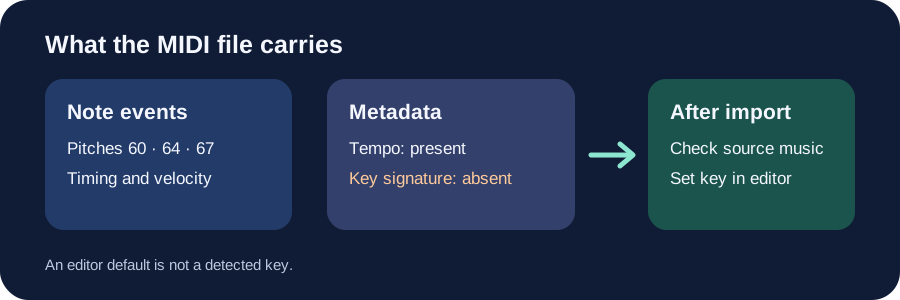
The current createMidi function writes note-on and note-off events using MIDI pitch numbers. It also writes one Set Tempo event, a track name, and end-of-track. There is no FF 59 02 key-signature meta-event, key-detection step, or key setting in this tool. The result can contain a C, E, and G without claiming the whole song is in C major.
FILE-FORMAT DISTINCTION

MIDI can carry more than this export does

The MIDI Association's account of Standard MIDI File metadata identifies key signatures among supported meta-events. The format's capability does not mean every writer emits that event. This page describes this site's writer only.

Original diagram showing detected MIDI note pitches in the export, no key-signature event, and a separate editor step to set a key after import
Note pitches are exported; the key-signature choice remains a separate editing decision.
Synthetic input to the current writerNote-on eventsKey-signature eventsTempo events
One note, MIDI pitch 60, from 0 to 1 second101
Three notes, MIDI pitches 60, 64, 67, each one second301

These are two local calls to the site's current createMidi with synthetic note objects, 120 BPM and Quantize Off. They test file writing, not transcription accuracy or musical-key inference. Download the original input and event-count data.

AFTER CONVERSION

Keep the audio as your reference

Download the MIDI, import it into a DAW or notation editor, and keep the original recording alongside it. Check the detected notes first. A correct pitch list for one passage does not by itself determine the tonal center or notation for the entire piece.

IN YOUR EDITOR

Choose the key deliberately

Use a known score if you have one; otherwise inspect the full musical context and listen to the recording before choosing a key signature. Set it in the editor, then check how notes are spelled and displayed. Do not transpose the notes merely to change the displayed key label. For the separate bar-grouping question, see the time-signature limit.

QUICK ANSWERS

Key-signature questions

Why does my score editor show C major after import?

That can be the editor's project default. This converter did not write a key-signature event, so verify the editor setting and the source music before treating the label as detected information.

Does the pitch-range control set the song's key?

No. It limits the frequencies considered by pitch detection. It does not choose a tonal center or add a key-signature event.

Will changing the key signature repair wrong notes?

Not by itself. First compare the note pitches and timing with the source recording; then set notation metadata separately. Check your editor's behavior before applying transposition.

Can a Standard MIDI File contain a key signature?

Yes, the file format supports key-signature metadata. This converter's current writer simply does not emit it.