mp3 to midi
Runs locally in your browser

METER-METADATA LIMIT

Audio to MIDI Time Signature: Does This Export Include Meter?

No. This converter does not detect a meter such as 3/4 or 4/4 from audio, and its MIDI writer does not include a time-signature meta-event. The Tempo control sets BPM for the exported note timing; the Quantize control snaps note positions to a grid. Neither tells the downloaded file how many beats make a bar. After importing the MIDI, set the project meter in your DAW or notation editor from the music you know and check the note positions against the source audio.

TEST YOUR FILE

Convert notes without guessing the meter

The downloaded MIDI contains detected notes. Set bar grouping after import.

INPUT  MP3 / WAV / M4A / FLAC / OGG → OUTPUT  .MID

Drop one audio file here

or click to choose audio from your device

Choose audioMP3, WAV, M4A, FLAC, or OGG · one file · up to 50 MB / 5 minutes
Or record a short sound with your microphone.

Your audio stays on your device. All processing happens in this browser. No file is uploaded to a server.

No sign-upOne file at a timeNo watermark

SOURCE-CODE CHECK

Tempo is present; meter is absent

The current createMidi function starts a single-track MIDI file with one Set Tempo event (FF 51 03). It then writes a track name, note-on and note-off events, and an end-of-track marker. There is no time-signature meta-event (FF 58) or meter-detection step in this code. This is a statement about this converter's output, not about all MIDI files.
FORMAT DISTINCTION

A file can support meter metadata

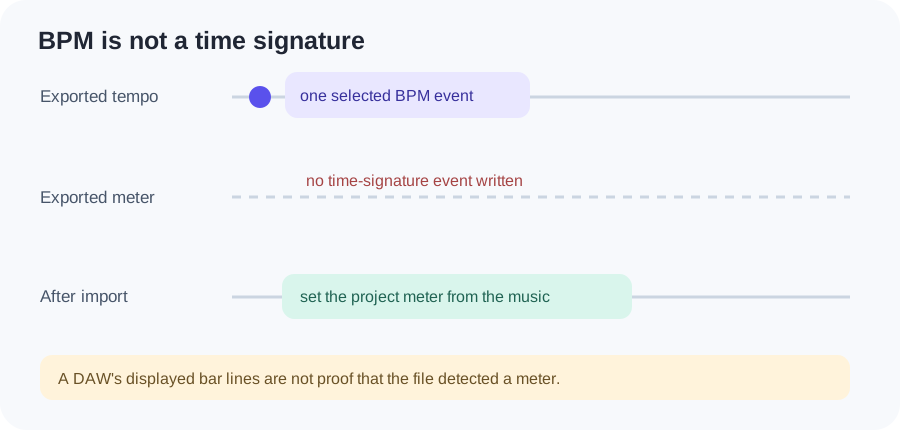
The MIDI Association's Standard MIDI Files page says the format supports both tempo and time-signature information. Support in the format does not mean this tool writes both. A DAW may display its own project meter when you import the file; do not mistake that display for a meter detected in the source recording.

Original comparison of a MIDI file's fixed tempo event and missing time-signature event, followed by a project meter selected after import
The project-meter lane is a suggested post-import action, not data this converter generated.
Test input to current writerTempo eventsTime-signature eventsObserved note-off tick
One A4 note from 0 to 1 second; 120 BPM; Quantize OffOne FF 51 03Zero FF 58960
Same note; 90 BPM; Quantize OffOne FF 51 03Zero FF 58720

This is a local test of the site's current createMidi function using a synthetic note object, not an audio-transcription accuracy test. The writer uses 480 ticks per quarter note: one second maps to 480 × BPM / 60 ticks. Download the original test data to see the inputs and observed event counts.

BEFORE EXPORT

Do not use BPM as a meter setting

Use Tempo for the speed of the reference beat if you know it. Use Quantize only when you want detected note positions snapped to the chosen subdivision. A quarter-note grid does not tell the file whether each bar contains three, four, or another number of beats. For a source that changes speed, see the tempo-map limit.

AFTER IMPORT

Set bar grouping in your editor

Listen to the original recording, identify its recurring accents or a known score, and set the destination project's time signature there. Keep the audio track as a reference. Check where note attacks land relative to bar lines; adjust the destination project's meter or note placement deliberately if they do not match. The MIDI file alone cannot prove the source meter.

QUICK ANSWERS

Audio-to-MIDI meter questions

Does this converter put 4/4 in the downloaded MIDI?

No. Its writer has no time-signature event. If an editor shows 4/4 after import, check the editor's project settings rather than assuming the converter detected that meter.

Does changing Tempo also change the time signature?

No. Tempo changes the exported BPM and note positions in ticks. Time signature is separate bar-grouping information.

Can Quantize choose 3/4 or 6/8?

No. The Quantize menu selects note-position subdivisions, not meter.

How can I add the correct meter?

Set it in a DAW or notation editor after importing the MIDI, using the original audio or a known score as your reference.