mp3 to midi
Runs locally in your browser

TEMPO-MAP LIMIT

Audio to MIDI Tempo Changes: Does This Converter Create a Tempo Map?

No. This converter writes one tempo event at the start of its MIDI file, using the BPM selected in the Tempo control. It does not detect changing beats in the source or write a later tempo change. Choose a representative BPM before export. For a performance that speeds up or slows down, import the MIDI into a DAW and build or edit its tempo map there; inspect note positions after each change. The Tempo slider is not an automatic tempo-following switch.

TEST YOUR FILE

Convert with a chosen export tempo

The downloaded MIDI uses the selected BPM. This browser tool does not analyze a tempo curve.

INPUT  MP3 / WAV / M4A / FLAC / OGG → OUTPUT  .MID

Drop one audio file here

or click to choose audio from your device

Choose audioMP3, WAV, M4A, FLAC, or OGG · one file · up to 50 MB / 5 minutes
Or record a short sound with your microphone.

Your audio stays on your device. All processing happens in this browser. No file is uploaded to a server.

No sign-upOne file at a timeNo watermark

SOURCE-CODE CHECK

One event, at the beginning

The current MIDI writer takes the selected BPM, computes microseconds per quarter note as round(60,000,000 / BPM), and writes one FF 51 03 Set Tempo event at tick zero. Its event loop writes note-on and note-off messages; it does not insert another Set Tempo event. The exported file has a fixed tempo until another application edits it.
WHAT THE SLIDER DOES

It maps seconds to beats

The writer uses 480 ticks per quarter note. It multiplies detected note times in seconds by the ticks-per-second value derived from your BPM, then optionally rounds those ticks to a quantize grid. Moving Tempo changes the exported beat positions and its single tempo event; it does not listen for a conductor or follow a live drummer.

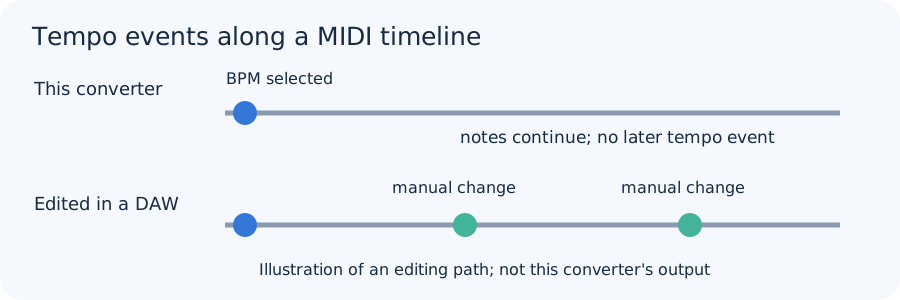
Original diagram contrasting this converter's one initial MIDI tempo event with a later manually edited multi-event DAW tempo map
The lower timeline is a suggested editing workflow in a DAW, not an output this converter generates.
Selected BPMCode formulaTempo event valueWhat it means
120round(60,000,000 / 120)500,000 microseconds per quarterOne fixed setting written at the start.
90round(60,000,000 / 90)666,667 microseconds per quarterAnother single fixed setting, not a tempo ramp.

These values are calculations from this site's current createMidi function, not measured tempo estimates from music. The writer emits a tempo meta-event followed by note events. Download the original calculation sheet to inspect the inputs and formula.

STEADY PERFORMANCE

Set a known BPM first

If the recording follows a known click, select that BPM before conversion. Try Quantize Off first if the performance has expressive timing, then compare the downloaded MIDI against the audio in your DAW. The timing guide separates a tempo mismatch from late playback and missed notes.

RUBATO OR TEMPO CHANGE

Edit after import

Export the detected notes, import the MIDI into a DAW, and place tempo changes at known musical landmarks there. Compare note attacks against the original audio after each edit. If the destination stretches audio when its tempo map changes, check that app's audio-follow settings; this site's MIDI file cannot control them. For grid movement, see the quantization guide.

QUICK ANSWERS

Audio-to-MIDI tempo questions

Does this tool follow a recording that speeds up?

No. It detects note events in audio time but writes one selected BPM at the start of the MIDI file, with no later tempo-map events.

Can I change the BPM after downloading?

Yes, in a MIDI editor or DAW. Whether audio also follows the tempo change depends on that application's settings, so compare the tracks there.

Will a different BPM recover missing notes?

No. BPM affects exported timing; pitch detection happens separately. Check the source and detection controls for missing notes.

Does Quantize create a tempo map?

No. Quantize rounds accepted note positions to one selected beat grid. It does not write additional tempo events.