mp3 to midi
Runs locally in your browser

SOLO FLUTE WORKFLOW

Flute Audio to MIDI

Record or upload a short flute melody with one pitched line and as little accompaniment as possible. Convert it in the tool below, compare the note preview with the recording, then download the .mid file. If a breathy start is missing or creates a fragment, separate the unpitched breath from the held tone before adjusting Silence threshold or Minimum note. This browser converter detects one pitch at each analysis moment; it does not split a flute duet into separate tracks.

PROCESS ON THIS DEVICE

Upload or record one flute melody

Try a short clean phrase first. Listen to the source and compare its note starts and tails with the detected notes.

INPUT  MP3 / WAV / M4A / FLAC / OGG → OUTPUT  .MID

Drop one audio file here

or click to choose audio from your device

Choose audioMP3, WAV, M4A, FLAC, or OGG · one file · up to 50 MB / 5 minutes
Or capture a clean flute phrase with your microphone.

Your flute recording stays on your device. All processing happens in this browser. No file is uploaded to a server.

No sign-upOne file at a timeNo watermark

CONTROLLED SIGNAL CHECK

What one browser test actually showed

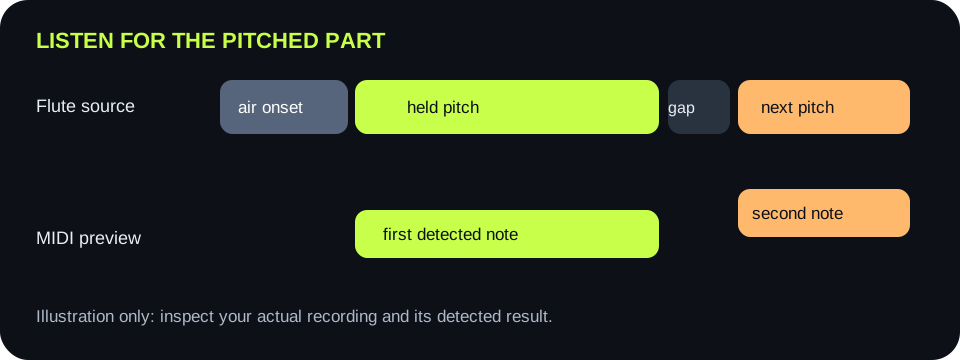
A locally generated WAV contained a brief low-level noise onset, a held 659.25 Hz tone, a gap, and a held 783.99 Hz tone. With the displayed default controls, this page completed conversion and showed two notes in MIDI range 76–79. This is a software-path check using a synthetic signal, not a test of a real flute recording or a claim about transcription accuracy.

BEFORE TUNING CONTROLS

Separate air from stable pitch

Play the beginning of one note. Mark where the audible flute pitch becomes steady, not just where the first breath occurs. The algorithm estimates pitch only when a frame is loud enough and sufficiently periodic. Airy noise can be audible without meeting that test.

SECOND CHECK

Find the intended gap

Listen between two flute notes. A clean pause can separate detected note blocks; connected breath or room noise can obscure that boundary. Compare the preview against the actual performance before deciding that a missing gap is an error.

Three parts of a flute phrase: breathy onset, steady pitched tone, and intended gap before the next note
The pitch-bearing part of the sound is the reference. A breathy onset need not be a MIDI note; a real held pitch should not disappear without checking the source and controls.
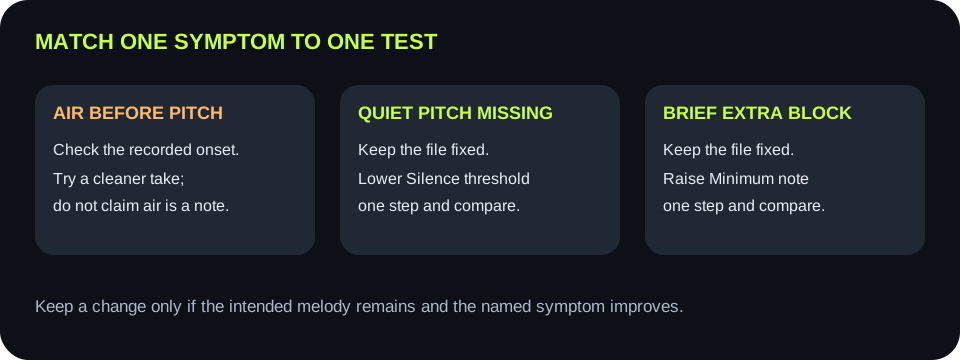
Preview symptomFirst source checkSingle testKeep condition
First tone starts lateIs the beginning mostly air before a stable pitch?Record a cleaner onset of the same short phraseThe block starts closer to the audible pitched tone
Extra short block before a held noteIs there a noisy breath or unstable onset?Keep the file fixed; raise Minimum note one stepThe extra block vanishes while a real short note survives
Quiet held note is absentCan you hear a steady pitch above room noise?Keep the file fixed; lower Silence threshold one stepThe intended note appears without noise blocks
Two notes mergeIs there an audible gap in the source?Make a new recording with a clear gap; do not also move slidersThe preview follows the intended two-note separation
High tone is absentIs its pitch beyond the displayed High bound?Widen only the High pitch edgeThe intended block returns without unrelated high blocks
A source-first flute MIDI decision path that separates airy-onset recording changes from threshold and minimum-note control changes
Changing the recording and a control in the same comparison cannot show which change mattered. Keep the source fixed for slider tests.

CODE CHECK

Loudness and periodicity are separate gates

The shared detector computes frame loudness and rejects frames below Silence threshold. It then looks for a stable repeated waveform pattern; a frame without a strong periodic match has no pitch. Lowering the threshold can admit quiet pitched frames, but it cannot turn unpitched breath into a reliable note.

DURATION CHECK

Short fragments are filtered later

After pitch detection, adjacent frames with the same rounded MIDI note are grouped. Minimum note then removes detected events shorter than the chosen duration. Raise it only for brief unwanted fragments, because a real short flute note can also be removed.

QUICK ANSWERS

Flute audio-to-MIDI questions

Can I convert a flute recording to MIDI here?

Yes, for a clean single-pitch flute melody. Choose an accepted audio file or record in the browser, convert it, inspect the preview, and download a .mid file.

Why is the breath at the beginning not a MIDI note?

Breath noise may be audible without a stable pitch. This detector requires sufficient loudness and a periodic pitch pattern before it can write a note.

Should I lower Silence threshold for a missing note?

Only after checking that the source contains an audible pitched tone. Lower it one step with the same file, and keep it only if the note appears without extra noise events.

Can it split two simultaneous flutes into separate MIDI tracks?

No. It estimates one pitch per frame and exports one detected note line. Use isolated parts if separate tracks are needed.

Does this page send my flute recording to a server?

No. Audio decoding, note detection, preview, and MIDI creation happen in your browser.