mp3 to midi
Runs locally in your browser

BOWED MELODY WORKFLOW

Violin Audio to MIDI Converter

Upload or record an isolated violin melody with one sounding pitch at a time, convert it below, compare the detected-note preview with the recording, then download the .mid file. A sustained bow stroke can contain vibrato and changing loudness; this browser tool estimates one pitch per analysis frame and does not isolate simultaneous strings or the rest of an ensemble. Inspect unexpected note splits before changing a control.

PROCESS ON THIS DEVICE

Upload or record one violin melody

Try a short clean phrase first. Listen to the source and compare its note starts and tails with the detected notes.

INPUT  MP3 / WAV / M4A / FLAC / OGG → OUTPUT  .MID

Drop one audio file here

or click to choose audio from your device

Choose audioMP3, WAV, M4A, FLAC, or OGG · one file · up to 50 MB / 5 minutes
Or capture a clean violin phrase with your microphone.

Your violin recording stays on your device. All processing happens in this browser. No file is uploaded to a server.

No sign-upOne file at a timeNo watermark

LOCAL SIGNAL TEST

A small vibrato test stayed on one note

A locally generated WAV contained a steady 440 Hz segment, silence, and a second 440 Hz segment with a narrow synthetic pitch wobble. At the default controls, the browser showed “1 notes · MIDI 69–69 · 120 BPM” and enabled the MIDI download. This is a controlled signal check, not a result from a real violin or an accuracy measurement.

WHAT THIS MEANS

Inspect movement; do not assume a split

The observed narrow wobble did not create another exported note in this test. A different recording may cross a rounded note boundary or lose a short event. Compare the source and preview before changing settings.

START WITH THE SOURCE

One bowed pitch at a time

Record a short solo phrase without accompaniment. If a double stop or another instrument overlaps it, the detector still returns one pitch estimate per analysis frame. Use an isolated part, not a full mix, when you need a single violin line.

COMPARE THE RESULT

Watch long-note boundaries

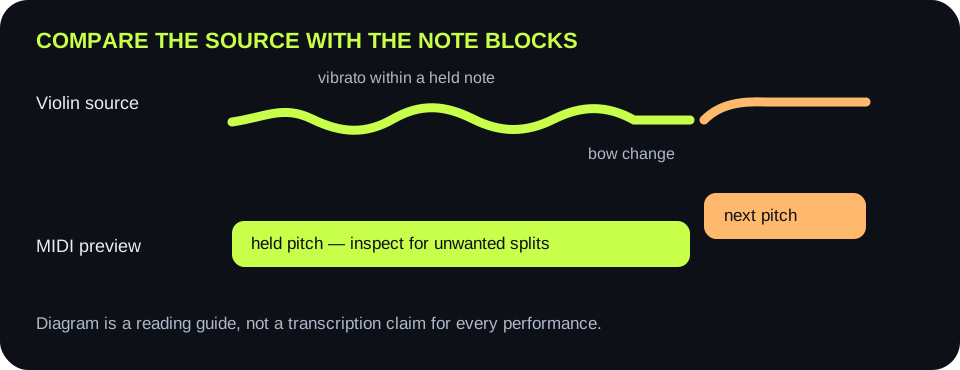
Replay one sustained note and mark where its vibrato, bow change, and release occur. Compare those moments with the piano-roll blocks. A block boundary inside one continuous note is a different symptom from a missing soft note at its end.

A violin recording with one sustained bowed note, vibrato, a bow change, and a second note compared to MIDI note blocks
Use the recording as the reference. A bow change is not automatically a new pitch; a note block should be judged against what was actually played.
What the preview showsListen forChange one thingKeep only if
One held note breaks into nearby pitchesWide vibrato or a pitch slide during the sustainFirst try a steadier recording of the same phraseThe intended pitch remains without false block changes
Brief extra block at a bow reversalScrape or unstable onset at the bow changeWith the same file, raise Minimum note one stepThe brief block disappears but real short notes stay
Soft ending disappearsA quiet but audible note releaseWith the same file, lower Silence threshold one stepThe ending returns without room noise becoming notes
Several simultaneous strings collapse into one lineA double stop or another instrumentIsolate a single-pitch violin line before conversionThe source has one intended pitch at a time
A real high note is missingWhether its pitch lies outside the current windowWiden only the relevant Pitch range edgeThe note appears without unrelated high-frequency blocks
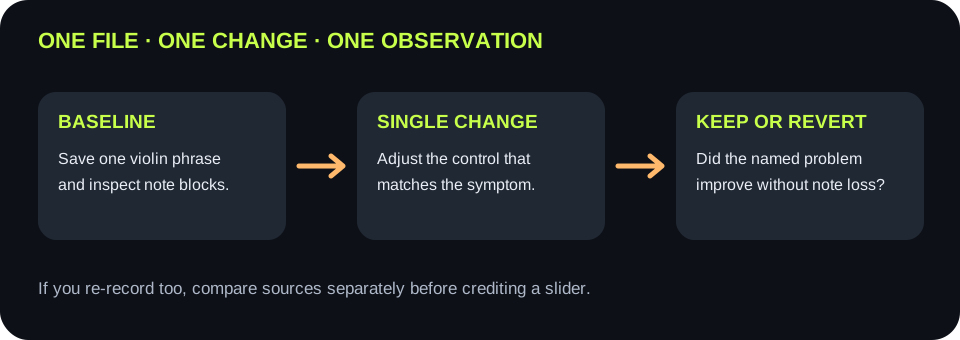
A controlled violin MIDI test comparing an unchanged source, one control adjustment, and the observed preview
Keep the source unchanged when testing controls. Re-recording and changing a slider together would hide which change affected the result.

WHY SPLITS HAPPEN

Pitch is rounded to notes

The shared code detects a frequency in each frame, converts it to a rounded MIDI note, smooths neighboring frames, and groups consecutive frames with the same MIDI note. A sustained pitch that moves far enough across a note boundary can appear as multiple blocks. This is a code-level explanation, not a promise about every recording.

CONTROL BOUNDARIES

Duration is not pitch repair

Minimum note removes short detected events. Silence threshold filters quiet frames. Neither setting separates simultaneous violin pitches or corrects a bowed slide. Try the control that matches the visible symptom and keep the change only when an intended note survives.

QUICK ANSWERS

Violin audio-to-MIDI questions

Can I convert a violin recording to MIDI here?

Yes, when the source is a clean single-note violin melody. Upload or record it, inspect the browser-generated preview, and download the .mid file.

Will vibrato always create extra MIDI notes?

No universal result is claimed. Compare a held note in your recording with its preview. The code rounds each detected frame to a MIDI pitch, so sufficiently large pitch movement may cross a note boundary and split a block.

Can this separate a double stop into two MIDI notes?

No. It estimates one pitch per frame. Isolate separate parts before conversion if you need separate lines.

Should I change Minimum note when the end of a soft note is missing?

Check loudness first. Minimum note filters short events; the Silence threshold controls whether quiet frames are considered. Lower the threshold one step and keep it only if the intended tail returns without extra noise events.

Does this page upload the recording?

No. The audio is decoded and analyzed in your browser; the file is not sent to a server.

Download the violin preview check (.csv)