Why Short Notes Disappear in Audio to MIDI Conversion
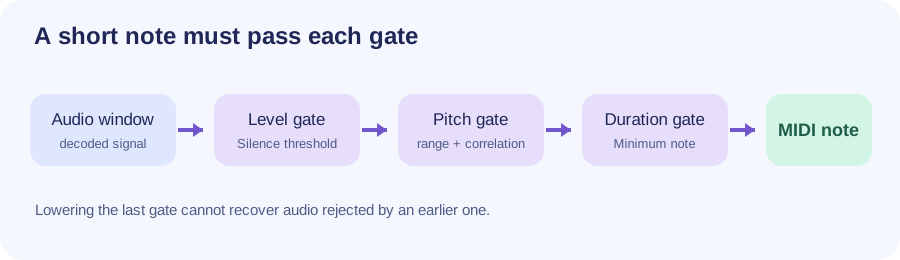
A short sound is not automatically a MIDI note. In this converter, an audio frame must pass the silence check and yield a usable pitch; adjacent frames of the same detected pitch must then form a note long enough to pass Minimum note. A quiet, noisy, out-of-range, or very brief sound can fail before a note is exported. Test the same file below and change only one control at a time.
Quiet note missing: try a lower Silence threshold.
Stable but brief note missing: try a lower Minimum note.
High or low note missing: check Pitch range.
No detected pitch: shortening the duration filter alone cannot create one.
PROCESS ON THIS DEVICE
Test the missing note
Use one clear recording. Compare the piano-roll preview and note count after each single-control change, then download the .mid file.
INPUT MP3 / WAV / M4A / FLAC / OGG → OUTPUT .MID
Drop one audio file here
or click to choose audio from your device
Choose audioMP3, WAV, M4A, FLAC, or OGG · one file · up to 50 MB / 5 minutes
Or record a short single-note melody with your microphone.
♪
RESULT
Your MIDI is ready
HIGHLOW
Your audio stays on your device. All processing happens in this browser. No file is uploaded to a server.
No sign-upOne file at a timeNo watermark
SOURCE-CODE CHECK
Three different gates
The script measures frame level against Silence threshold, searches for a pitch inside Pitch range, and groups consecutive accepted pitch frames. It only keeps a grouped note if its duration reaches Minimum note. A lower duration setting helps only at the last gate; it cannot repair a frame that never produced a pitch.
DO NOT CONFUSE
Quantize is later
Quantize changes the timing of MIDI events after notes have been detected. It cannot bring back an omitted note. Tempo changes how a beat grid is interpreted; neither control repairs a failed audio detection step.
These are sequential checks in this site's current script. A missing note can stop at more than one gate.
Part of this converter
Current source-code value
What it means
Analysis sample rate
12,000 samples/second
Decoded audio is downsampled before pitch analysis.
Analysis frame
2,048 samples, about 171 ms
Pitch is estimated from a window, not from an instantaneous point.
Frame hop
512 samples, about 43 ms
Neighboring windows overlap; this is not a hard minimum note length.
Default Minimum note
90 ms
A grouped detected note shorter than this is discarded.
The time conversions are arithmetic from app.js: samples ÷ 12,000 × 1,000. They are implementation facts, not a promise that any particular real-world note will be recovered.
ONE-CHANGE TEST
Find the failed gate
Keep the recording fixed. First run the defaults and write down the note count and where the expected note should appear. Lower Minimum note one step and convert again. If it is still absent, reset that control; try a lower Silence threshold. Finally widen only the relevant end of Pitch range. Keep a change only when the intended note appears without unwanted fragments.
SOURCE QUALITY
Use a clear single-note phrase
A dense mix, drum hit, room echo, or pitch slide can confuse a monophonic pitch estimate. Trim to an isolated phrase if possible. Do not rename an audio file to a different extension; a failed decode is separate from a missing detected note.
In this tool, it may fail the loudness check, yield no stable pitch in the selected range, or form a detected note shorter than Minimum note. Test those gates one at a time with the same file.
Will lowering Minimum note always fix it?
No. That filter acts only after pitch frames have been grouped into a note. Lowering it can also retain unwanted fragments.
Can Quantize restore a note that was not detected?
No. Quantize moves the timing of retained notes; it does not analyze the original audio again or add missing pitches.
Is 171 ms the minimum audio note length?
No. It is this script's analysis-window duration. Overlapping windows and the duration filter are separate mechanisms, so it is not a guaranteed recoverability cutoff.