mp3 to midi
Runs locally in your browser

PITCH-BEND OUTPUT CHECK

Audio to MIDI With Pitch Bend?

No. This browser converter detects one pitch at a time and exports discrete MIDI note events; it does not write continuous pitch-bend events. You can convert a clear solo melody below and download its notes, but keep the original audio if bends, scoops, slides, or vibrato must be preserved. Compare the detected blocks with the recording, then add expressive bend data in a MIDI editor only if you need it.

PROCESS ON THIS DEVICE

Convert a clean melody to note events

Inspect the note preview, then download the .mid file. This tool does not encode the continuous bend inside a note.

INPUT  MP3 / WAV / M4A / FLAC / OGG → OUTPUT  .MID

Drop one audio file here

or click to choose audio from your device

Choose audioMP3, WAV, M4A, FLAC, or OGG · one file · up to 50 MB / 5 minutes
Or record a short single-note melody with your microphone.

Your audio stays on your device. All processing happens in this browser. No file is uploaded to a server.

No sign-upOne file at a timeNo watermark

CONTROLLED SIGNAL CHECK

What a synthetic glide produced here

A locally generated WAV held a 440 Hz tone, glided toward 493.88 Hz, then held the second tone. At the displayed defaults, the browser conversion finished with three detected note events in MIDI range 69–71. This demonstrates one possible stepped-note result of this code path; it is not a real performance or a bend-accuracy claim. The MIDI writer still has no pitch-bend event step.

MIDI FORMAT

Note events and bend events are different

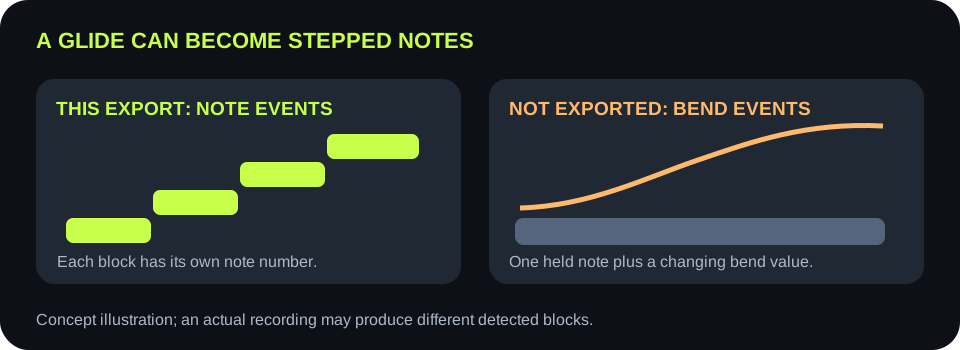
A MIDI note-on event selects a note number and velocity; note-off ends it. A pitch-bend change is a separate channel message. The MIDI Association lists these as distinct MIDI message types. A sequence of neighboring note numbers is not the same as one held note with a changing bend value.

THIS SITE'S CODE

The writer does not emit bend messages

The shared script converts each accepted pitch estimate into a rounded MIDI note number and writes note-on and note-off events. Its MIDI writer has no pitch-bend event creation step. The piano-roll preview therefore shows note blocks, not a continuous bend curve.

Side-by-side concept map showing separate note blocks from this converter versus a held note plus pitch-bend data that this converter does not export
A pitch glide in the recording may appear as stepped note blocks, or some transition frames may be filtered. Neither outcome preserves a continuous bend message.
What you hearWhat to inspect hereNext honest step
Two steady target notes joined by a slideAre the target-note blocks present, even if the slide becomes steps?Keep the original audio for reference; edit a bend between target notes later if needed
A single held note with vibratoDoes the preview split the held note into multiple rounded pitches?Choose a stable target note, then create expression in a MIDI editor; do not call the steps a preserved vibrato curve
A short decorative scoopDoes Minimum note remove the scoop's brief blocks?Accept a note-only sketch or use a workflow that explicitly exports bend events
You need an editable lead line, not exact expressionAre note centers and timing usable?Download .mid and refine notes in a DAW
You need the original pitch movement exactlyDo not use the note count as proof of expression captureRetain the original recording; this export cannot provide that guarantee
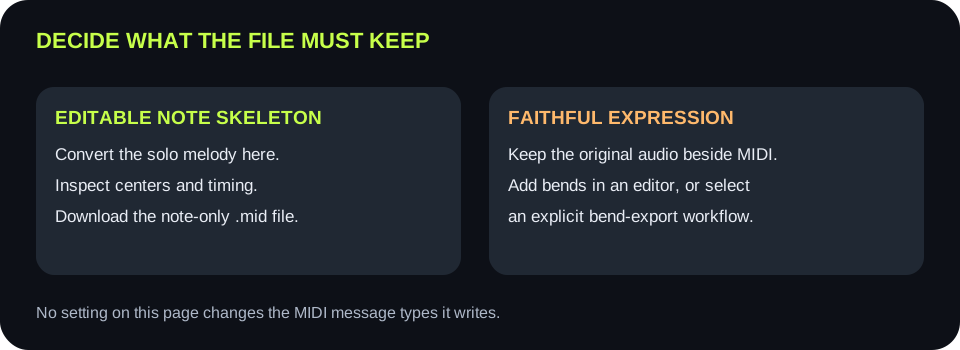
Decision path: use note-only MIDI for editable melody, preserve original audio for expression, and add or source explicit pitch-bend events separately
Choose the deliverable first: editable note skeleton or a faithful pitch-bend performance. The current converter supplies only the first.

CONTROL CHECK

Sliders cannot add missing MIDI event types

Silence threshold, pitch range, and Minimum note change which note events survive detection. Tempo and quantization change exported note timing. None of these controls adds pitch-bend messages, so avoid tuning sliders in the hope that a bend curve will appear in the file.

SOURCE CHECK

Keep the recording beside the notes

Save the original audio before editing the MIDI. In a DAW, compare a target note's start, duration, and sounding center against the source. Then decide whether manual pitch automation or a different transcription workflow is needed for the expressive movement.

LIMIT CHECK

Multiple simultaneous pitches are separate trouble

This detector estimates a single pitch per analysis frame. A chord or overlapping voices cannot be separated into independent expressive lines by changing the bend question. Work from isolated single-note phrases for the note-only sketch.

EVIDENCE CHECK

Inspect the exported events

The code path writes note-on and note-off status bytes, plus tempo and track metadata. It does not write the MIDI pitch-bend status family described by the MIDI Association. That is a code-level limit, not an estimate of how any particular performance will sound.

QUICK ANSWERS

Audio-to-MIDI pitch-bend questions

Does this MP3-to-MIDI tool preserve pitch bend?

No. Its .mid export contains detected note events and timing, not continuous pitch-bend events.

Why does one slide show as several notes?

The detector rounds changing frequency estimates into discrete MIDI note numbers. A long glide can pass through multiple numbers.

Can I adjust Minimum note to make a bend curve?

No. Minimum note filters short note events; it does not add bend data.

What if I need a faithful bend or vibrato?

Keep the original audio. Add expression in a MIDI editor after export, or use a workflow that explicitly creates pitch-bend events. Verify that workflow with your own source.

Does the site upload the recording?

No. Decoding, note detection, preview, and MIDI creation happen in the browser.

Format reference: MIDI Association's MIDI 1.0 message summary.