mp3 to midi
Runs locally in your browser

SUNG MELODY WORKFLOW

Singing Voice to MIDI

Record or upload one unaccompanied sung melody. Listen for the steady vowel in each note, then compare those pitched spans with the MIDI preview before downloading .mid. A consonant can interrupt the pitched vowel, and a long slide may pass through several detected notes. This tool estimates one pitch at a time; it does not transcribe lyrics or separate harmonies.

PROCESS ON THIS DEVICE

Upload or record one sung melody

Use a short phrase with one sung note at a time; compare the note blocks with the source before changing controls.

INPUT  MP3 / WAV / M4A / FLAC / OGG → OUTPUT  .MID

Drop one audio file here

or click to choose audio from your device

Choose audioMP3, WAV, M4A, FLAC, or OGG · one file · up to 50 MB / 5 minutes
Or sing a short solo phrase into your microphone.

Your singing recording stays on your device. All processing happens in this browser. No file is uploaded to a server.

No sign-upOne file at a timeNo watermark

CONTROLLED SIGNAL CHECK

What one browser test actually showed

A locally generated WAV used a quiet noise onset before each of two harmonic pitched tones, with a gap between them. The tones had fundamentals of 220 Hz and 293.66 Hz. With the displayed default controls, this page completed conversion and showed two notes in MIDI range 57–62. This synthetic test checks the conversion path; it is not a real singing performance or an accuracy claim.

FIRST LISTEN

Mark the voiced vowel, not the entire word

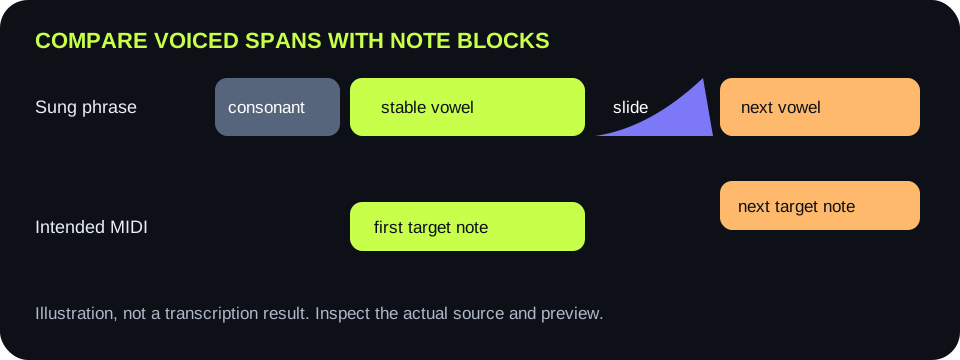
In a sung word, the audible consonant can begin before the steady pitched vowel. Listen to the vowel center of each intended note. Compare that span with the detected note block instead of expecting a MIDI event to begin at every syllable's first sound.

SECOND LISTEN

Decide whether the pitch moved on purpose

A sung scoop, fall, or portamento passes through intermediate frequencies. If the melody is meant to contain only two target notes, write down where those targets are sustained and where the transition lies. The preview can expose extra stepped notes through the slide; it cannot infer your musical intention.

Sung syllable map distinguishing consonant noise, stable pitched vowel, slide, and next stable note
The audible start of a word is not always the start of a stable pitch. Use the recording to mark the spans you expect to become MIDI notes.
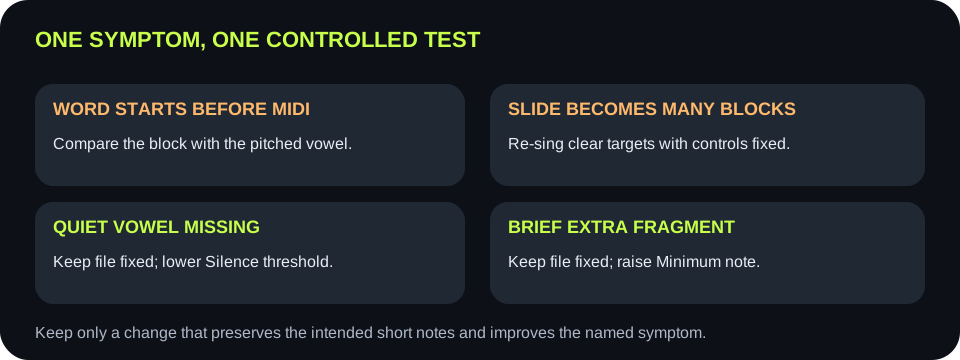
Preview symptomCheck the sourceChange one thingKeep only if
Note begins after the word startsIs the first part an unpitched consonant?Compare against the sustained vowel, without moving a sliderThe block starts near the first stable sung pitch
One scoop becomes several blocksDoes the source glide slowly through intermediate pitches?Re-sing with clearer target-note holds; keep the controls fixedThe preview matches the intended target notes
Soft vowel disappearsIs a pitched vowel audible above the room noise?Lower Silence threshold one step with the same fileThe vowel appears without extra noise blocks
Brief consonant-like block appearsIs it shorter than a real sung note?Raise Minimum note one step with the same fileThe fragment disappears and intended short notes survive
A harmony becomes one unstable lineAre two voices sounding together?Use an isolated single singer instead of another slider changeOne melodic line is visible and audibly traceable
Decision path comparing a sung note source with the preview, then testing one source or control change
Keep the source fixed for a slider comparison. Keep the controls fixed when comparing a new vocal take.

CODE CHECK

Voiced pitch must pass two gates

The detector rejects frames below Silence threshold, then requires a repeated waveform pattern strong enough to estimate pitch. An audible consonant may fail the periodicity check. Lowering threshold alone cannot turn an unpitched sound into a reliable note.

NOTE GROUPING

Continuous singing becomes note events

Accepted pitches are rounded to MIDI notes, median-smoothed with nearby frames, then adjacent equal notes are grouped. Minimum note removes events shorter than its chosen duration. It may also remove a real quick note, so compare before keeping a longer setting.

OUTPUT BOUNDARY

Lyrics do not travel with this MIDI

The .mid file contains detected note events, not words, vowels, pronunciation, or the singer's recorded timbre. Assign an instrument or voice sound after importing the MIDI into music software.

REPEATABLE TEST

Write down the intended melody first

Before trying a control, note the intended pitch targets and audible boundaries. After conversion, compare the visible blocks and preview sound with that target. Do not treat a higher note count by itself as improvement.

QUICK ANSWERS

Singing voice-to-MIDI questions

Can I convert a sung melody to MIDI here?

Yes, if it is a clear solo melody. Record or upload audio, convert in the browser, inspect the detected notes, and download .mid.

Will the MIDI include my words?

No. It writes note events, not lyrics or vocal audio.

Why does a pitch slide create extra notes?

A slide moves through intermediate pitches. This detector groups rounded pitch estimates into note events; re-sing with steadier target holds if you want fewer transition notes.

Why does a word seem to start late?

The initial consonant can be audible before the first stable pitched vowel. Compare the block with the vowel, not just with the word's first sound.

Can it separate a duet or backing harmony?

No. The shared converter estimates one pitch at a time. Use an isolated solo vocal line.

Does it upload my voice?

No. Audio decoding, note detection, preview, and MIDI creation occur in your browser.