mp3 to midi
Runs locally in your browser

PEDAL-DATA LIMIT

Audio to MIDI Sustain Pedal: Does This Converter Export CC64?

No. This tool does not extract sustain-pedal actions from audio and does not write MIDI Control Change 64 (CC64) events. It exports detected note-on and note-off events with one selected tempo. A piano note can keep ringing in the recording after the key is released, but that sound alone does not tell this tool when a pedal went down or came up. If you need editable pedal data, import the downloaded MIDI into a DAW and add or record CC64 there while checking the original audio.

TEST YOUR FILE

Convert notes, then inspect the MIDI

This browser tool writes note events, not sustain-pedal controller events.

INPUT  MP3 / WAV / M4A / FLAC / OGG → OUTPUT  .MID

Drop one audio file here

or click to choose audio from your device

Choose audioMP3, WAV, M4A, FLAC, or OGG · one file · up to 50 MB / 5 minutes
Or record a short sound with your microphone.

Your audio stays on your device. All processing happens in this browser. No file is uploaded to a server.

No sign-upOne file at a timeNo watermark

SOURCE-CODE CHECK

What this file writer emits

The site's createMidi function writes a tempo meta-event, a track-name meta-event, note-on messages (90 in hexadecimal), note-off messages (80), and an end-of-track marker. Its note-event loop has no Control Change message (B0) and no controller number 40 in hexadecimal. This describes this tool's current output, not every audio-to-MIDI product.
MIDI STANDARD

What CC64 would mean

The MIDI Association's Control Change table defines controller 64 as damper/sustain pedal: values up to 63 mean off, and values from 64 mean on. A note's end time and a pedal's state are separate kinds of information. This converter has no control or detector for that pedal state.

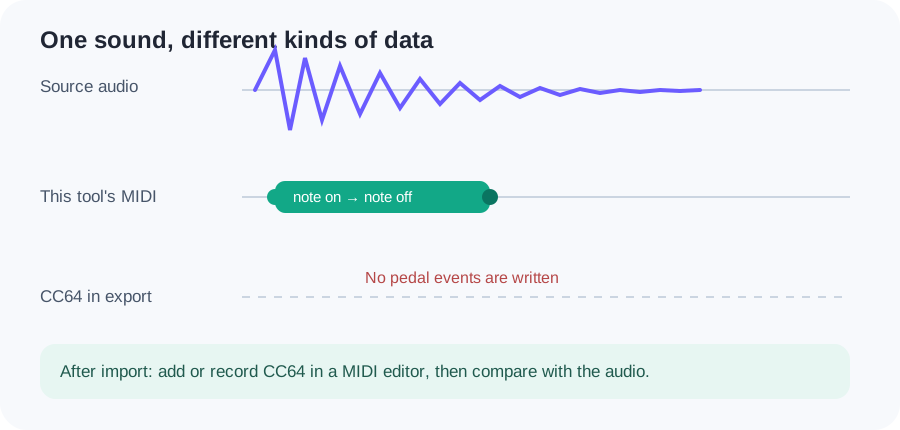
Original event diagram: audio ring-out leads to this tool's note-on and note-off events, but no CC64 pedal events; a DAW can add CC64 later
A ringing audio tail is audible evidence, not an unambiguous record of pedal presses. The lower pedal lane is an editing example, not this converter's export.
InformationThis tool writes it?Evidence or next step
Detected note starts and endsYesNote-on and note-off bytes in createMidi.
Selected fixed tempoYesOne FF 51 03 event at the beginning.
Sustain pedal CC64NoNo Control Change event in the writer. Add or record pedal moves in a DAW.
Original piano timbreNoKeep the original audio if you need its sound.

Download the original source-code event inventory. It is an inspection of this site's writer, not a claim that a pedal can be inferred from a waveform.

CONVERT CLEAN NOTES

Start with an isolated line

Choose or record a clear melody, convert it, and inspect note boundaries in the piano roll. A wash of reverb or overlapping piano notes can obscure the note events that this pitch-based tool is trying to detect. Lowering Minimum note may keep brief notes, but it cannot create CC64.

AFTER DOWNLOAD

Add pedal data where you can hear it

Import the MIDI into a DAW, play it beside the source audio, and add CC64 down/up events in the destination MIDI editor at the points you choose. Recheck note-offs and playback with the same instrument. If the source recording itself matters, retain it as a separate audio track. See the MIDI import guide for the basic handoff.

QUICK ANSWERS

Sustain-pedal questions

Will a sustained piano recording automatically produce CC64?

No. This converter writes note events, but no sustain controller events. Audio ring-out alone does not identify exact pedal transitions.

Does a long MIDI note mean the pedal was held?

No. Note duration describes this tool's detected note event. A separate CC64 message would describe a pedal state.

Can the Tempo or Minimum note controls add pedal events?

No. Tempo maps event timing; Minimum note filters short detected notes. Neither adds Control Change messages.

How do I keep sustain in the finished music?

Keep the original audio, or add/record sustain-controller moves after importing the MIDI into an editor that supports them. Compare the playback against the source.