mp3 to midi
Runs locally in your browser

VELOCITY OUTPUT CHECK

Audio to MIDI Velocity

This converter writes a velocity value for each detected MIDI note, but it estimates that value from the audio level of the accepted note frames. It does not recover how hard a performer struck a key, and the same source may sound different when played through another instrument. Convert a clear melody below, download the .mid file, and inspect its note velocities in a MIDI editor before treating them as musical dynamics.

PROCESS ON THIS DEVICE

Convert and inspect note events

Use a clear single-note phrase. The preview shows pitch and timing; download the .mid file to inspect velocity values in a MIDI editor.

INPUT  MP3 / WAV / M4A / FLAC / OGG → OUTPUT  .MID

Drop one audio file here

or click to choose audio from your device

Choose audioMP3, WAV, M4A, FLAC, or OGG · one file · up to 50 MB / 5 minutes
Or record a short single-note melody with your microphone.

Your audio stays on your device. All processing happens in this browser. No file is uploaded to a server.

No sign-upOne file at a timeNo watermark

THIS TOOL'S CODE

Audio level becomes one note value

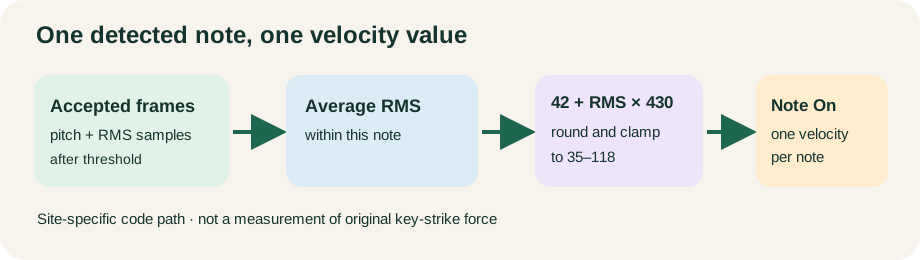
For each accepted note, the script averages the RMS of its detected frames. It then rounds 42 + averageRms × 430 and clamps the result between 35 and 118. The number is written with that note's MIDI note-on event. This is a site-specific mapping, not a universal audio-to-velocity formula.

IMPORTANT LIMIT

Velocity is not loudness automation

The writer creates one velocity value when each note begins. It does not write a changing volume envelope within the note. A louder recording level can also arise from microphone distance, gain, compression, or mixing rather than a harder performance.

Original diagram tracing accepted audio frames through average RMS, a bounded velocity calculation, and a MIDI note-on event
Only accepted pitch frames contribute to a note's average RMS. Frames below the silence threshold do not become that note's velocity.
Illustrative average frame RMSCode calculationWritten velocityWhat it does not prove
0.01round(42 + 0.01 × 430)46How hard a key was pressed
0.05round(42 + 0.05 × 430)64The source was musically mezzo-forte
0.10round(42 + 0.10 × 430)85Identical volume on every instrument
0.20round(42 + 0.20 × 430), then cap118More loudness detail beyond the cap

These are arithmetic examples derived from this site's current source code, not measurements of user recordings or promised conversion results. A note must first pass pitch detection and the Minimum note filter.

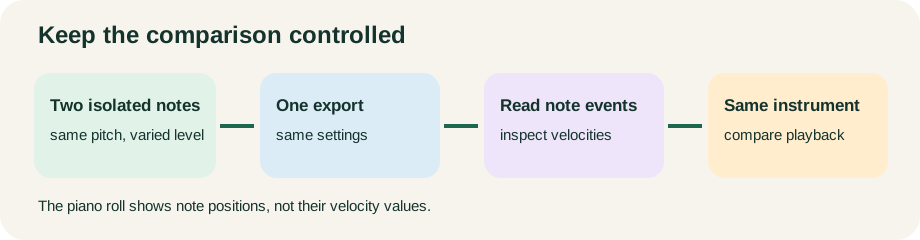
Original diagram showing one controlled audio-to-MIDI velocity comparison with fixed source, fixed settings, MIDI event inspection, and same playback instrument
Compare one variable at a time. The on-page piano roll is a pitch-and-time preview, not a velocity inspector.

TRY THIS

Compare two source notes fairly

Use a short isolated melody with two steady notes of the same pitch but different recorded levels. Keep browser controls unchanged. Export once and inspect each note-on velocity in a MIDI editor. If a quieter note disappears, lower the silence threshold carefully and compare again; do not interpret a missing note as velocity zero.

AFTER EXPORT

Separate event data from playback sound

Import the MIDI into one instrument track, keep that instrument and its settings fixed, then compare note velocities. To improve musical dynamics, edit the velocities by ear against the original audio. For a changing level within a sustained note, edit the appropriate expression or volume automation separately.
QUICK ANSWERS

Audio-to-MIDI velocity questions

Does MP3 to MIDI keep the original performance's key velocity?

No. An audio recording does not expose the original key-strike value to this converter. This tool estimates one value from accepted audio-frame RMS.

Why are two notes' MIDI velocities similar?

Their measured average levels may be close, or both may hit the mapping's cap. Check the exported event values, not only the piano-roll blocks.

Can the Silence threshold change velocity?

It first decides which frames have detectable pitch. Changing it can change which frames form a note, and therefore the note's average RMS, but it is not a direct velocity slider.

Does a higher velocity always sound louder?

That depends on the instrument and playback settings. Keep the same instrument when comparing exported notes.

Format reference: MIDI Association's MIDI 1.0 message summary. Related guides: why MIDI sounds different and pitch-bend export limits.