mp3 to midi
Runs locally in your browser

CLIPPED SOURCE CHECK

Clipped Audio to MIDI: Can a Distorted Recording Still Work?

Sometimes, for a simple pitched line. Clipping does not automatically make pitch detection impossible, but it changes the recorded waveform and can make the note result less trustworthy. Try the clean original or a new recording at a lower input level first. Convert the same short phrase with the same settings and compare the detected notes. A converter control cannot restore peaks already lost in the recording.

TEST YOUR FILE

Test one source in this browser

Use the original file first. Keep the same settings when comparing a cleaner recording.

INPUT  MP3 / WAV / M4A / FLAC / OGG → OUTPUT  .MID

Drop one audio file here

or click to choose audio from your device

Choose audioMP3, WAV, M4A, FLAC, or OGG · one file · up to 50 MB / 5 minutes
Or record a short sound with your microphone.

Your audio stays on your device. All processing happens in this browser. No file is uploaded to a server.

No sign-upOne file at a timeNo watermark

SOURCE FIRST

What clipping changes

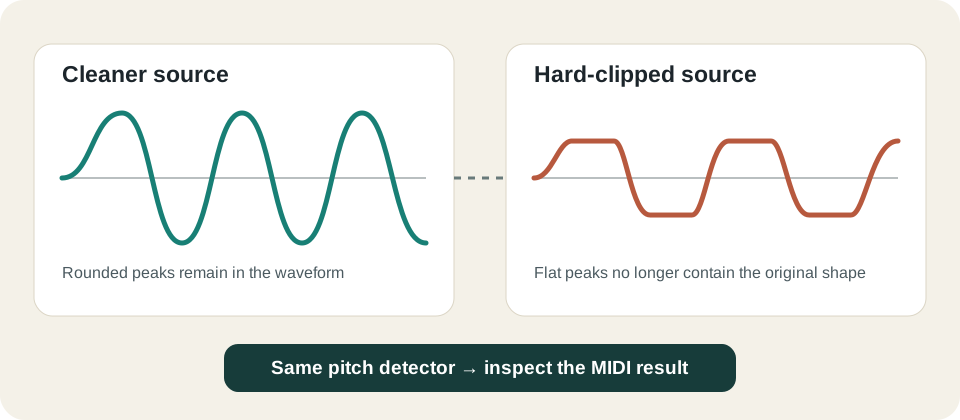
In a fixed-range recording, peaks above the allowed level are flattened. Audacity's recording troubleshooting manual describes a loud, distorted recording with waveform peaks touching the track boundaries as a likely clipping sign and recommends lowering the recording level. Turning down a file after those peaks were flattened makes it quieter; it does not recover the original shape.
THIS CONVERTER

What the detector sees

This site's detectPitch reads short audio frames, checks their level against Silence threshold, then searches for a repeating pitch. It does not run a declipping step. A clipped but regular single tone may still yield a pitch; a heavily distorted melody, overlapping instruments, or clipped attacks need direct listening and preview checks. This is a source limitation, not a promise about a particular recording.

Original diagram comparing a rounded sine-wave source with flattened clipped peaks before the same pitch-detection step
Peak shape changes before the converter receives the audio. A detected note is not proof that the source was undamaged.

One reproducible frame test

Input to this site's detectorPeak capReported pitchWhat this shows
Unclipped synthetic 440 Hz sineNo applied cap440.009 HzReference for this exact frame
Same samples hard capped±0.2440.266 HzA pitch was still reported
Same samples hard capped±0.05441.295 HzA pitch was still reported, with a different value

These values came from a local call to the current detectPitch function using a 2,048-sample frame at 12,000 samples per second, a 440 Hz synthetic sine, the default −45 dB threshold, and the same pitch bounds. They are single-frame observations, not MIDI-file conversions, real-recording accuracy, or a recommended clipping level. Download the original test readings (.csv).

IF YOU CAN RERECORD

Change the capture level

Record the same short solo phrase again with lower input gain. Keep microphone position and performance as similar as practical. Listen to both versions before conversion, then use the same pitch range, silence threshold, minimum note, tempo, and quantize settings for both. The cleaner take is the stronger source candidate when its notes match the performance better.

IF YOU ONLY HAVE THE CLIPPED FILE

Use a cautious preview

Convert a short section, inspect note count and the piano-roll boundaries, and compare them with the sound you can hear. If a pitch is wrong or attacks split into spurious notes, do not assume a control can reconstruct missing audio. You can test one control at a time with the controlled comparison worksheet, but stop when the source itself prevents a trustworthy result.

QUICK ANSWERS

Clipped audio and MIDI

Does clipping always stop MP3 to MIDI conversion?

No. In the controlled synthetic frame above, this site's detector still reported a pitch after hard clipping. That does not establish that an arbitrary clipped recording will produce useful MIDI.

Can I lower the volume to repair clipping?

Lowering the level after clipping reduces loudness but cannot recreate lost peaks. If the source recording is available, make a new take at a lower recording level.

Which converter slider fixes clipped audio?

None restores the original waveform. The sliders can change which frames or pitches become notes; they do not reverse source distortion.

Should I try WAV instead of MP3?

Use the cleanest original source you have. Saving an already clipped MP3 as WAV changes the container and encoding, not the lost peak shape. See the format guide for browser decoding and file-choice checks.