mp3 to midi
Runs locally in your browser

SINGLE-NOTE GUITAR WORKFLOW

Guitar Audio to MIDI Converter

Use a clean guitar recording with one note sounding at a time. Upload an MP3, WAV, M4A, FLAC, or OGG file, convert it below, inspect the note preview, and download the .mid result. Mute ringing strings between notes and keep drums, backing tracks, and chords out of the source: this converter estimates one pitch at each analysis moment, so it does not separate a guitar chord into individual MIDI notes.

PROCESS ON THIS DEVICE

Upload or record one guitar line

Try a short clean phrase first. Listen to the source and compare its note starts and tails with the detected notes.

INPUT  MP3 / WAV / M4A / FLAC / OGG → OUTPUT  .MID

Drop one audio file here

or click to choose audio from your device

Choose audioMP3, WAV, M4A, FLAC, or OGG · one file · up to 50 MB / 5 minutes
Or capture a clean guitar phrase with your microphone.

Your guitar recording stays on your device. All processing happens in this browser. No file is uploaded to a server.

No sign-upOne file at a timeNo watermark

LOCAL SIGNAL TEST

A separated phrase passed the first check

A locally synthesized WAV with plucked, decaying 220 Hz and 329.63 Hz tones separated by silence produced two detected notes, MIDI 57–64, at the default settings. This checks the tool with a controlled guitar-style signal; it is not a measurement of performance on real guitar recordings.

NEXT CHECK

Compare your own audio with the preview

Look at note starts and tails in your recording, then compare the same positions in the piano-roll preview. Keep the source file fixed when testing a control. Re-record only when the source itself contains a noisy attack or overlapping strings.

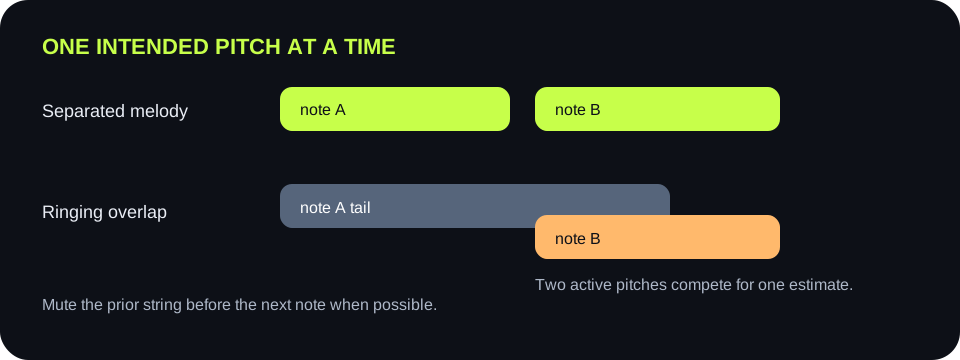
A single guitar line with separated notes compared with ringing notes and simultaneous strings
Listen for string overlap before changing a setting. The current detector cannot create separate notes for simultaneous guitar pitches.
What you seeCheck in the guitar audioFirst controlled testKeep it if
Several notes appear at one pick attackIs the pick transient much louder than the held note?Record a gentler attack, keeping the same phraseThe extra blocks disappear while the held pitch remains
One note runs into the nextIs a previous string still ringing?Mute the old string before the next note in a new recordingSeparate note blocks follow the intended melody
Short fragments appear during decayDo they occur as the pluck fades?Raise Minimum note one step with the same fileFragments vanish while real short notes remain
Soft sustained notes disappearAre they audible near the end of the source note?Lower Silence threshold one stepThe note tail returns before room noise becomes notes
A chord produces an incomplete resultAre multiple strings sounding at the same time?Record or isolate one note line at a timeEach moment has one intended pitch to detect
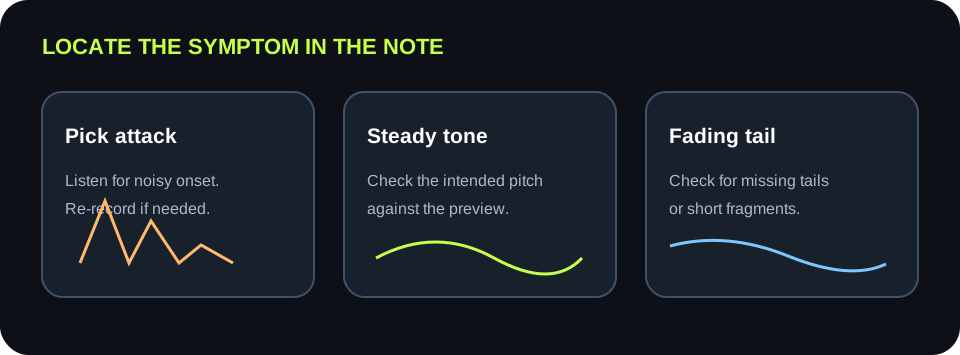
A guitar pluck divided into attack, stable note, and decaying tail with checks for each region
Compare a named part of the note before and after changing a control. A setting change cannot isolate simultaneous strings.

DETECTION

One pitch per frame

The shared converter returns one detected frequency or no frequency for each analysis frame. It does not identify separate strings in a chord or write multiple simultaneous guitar tracks.

SOURCE FIRST

Mute overlap before retrying

Two ringing strings create competing periodic patterns. Isolate a lead line and stop the previous string if its tail crosses the next note.

CONTROLS

Separate loudness from duration

Silence threshold filters quiet frames. Minimum note filters short detected events. Move one at a time so a change in the preview has an identifiable cause.

DESTINATION

MIDI is editable note data

The .mid file contains detected notes and timing, not the original guitar tone. Open it on an instrument track in your music app to hear it.

QUICK ANSWERS

Guitar audio-to-MIDI questions

Can this convert guitar audio to MIDI?

Yes, for a clean single-note guitar line. Upload or record the audio, convert it in the browser, preview detected notes, and download a .mid file.

Will it turn guitar chords into separate MIDI notes?

No. This detector estimates one pitch at each analysis moment. Record or isolate individual lines before converting if you need separate parts.

Why does a picked note split into fragments?

Check whether the split coincides with a noisy attack or fading tail. For a noisy source, record a cleaner phrase. For brief detected fragments, test Minimum note one step while keeping the file fixed.

Should I raise the silence threshold when soft notes are missing?

No. Raising it ignores more quiet audio. Test a slightly lower threshold and keep it only if the intended note returns without unwanted noise events.

Does this page upload my guitar recording?

No. The selected audio is decoded and analyzed in this browser. No file is uploaded to a server.

Download the guitar source test (.csv)