SOURCE
Hum one pitch at a time
The detector estimates one frequency or no frequency for each analysis frame. Chords and doubled voices do not become separate simultaneous MIDI tracks here.
HUMMED MELODY WORKFLOW
Hum one clear note at a time, leave a definite change between notes, and record in a quiet place. Use the microphone button below or upload a saved recording. The converter detects one pitch at each analysis moment, so harmony, backing music, strong echo, and continuous pitch slides can create unwanted or broken notes.
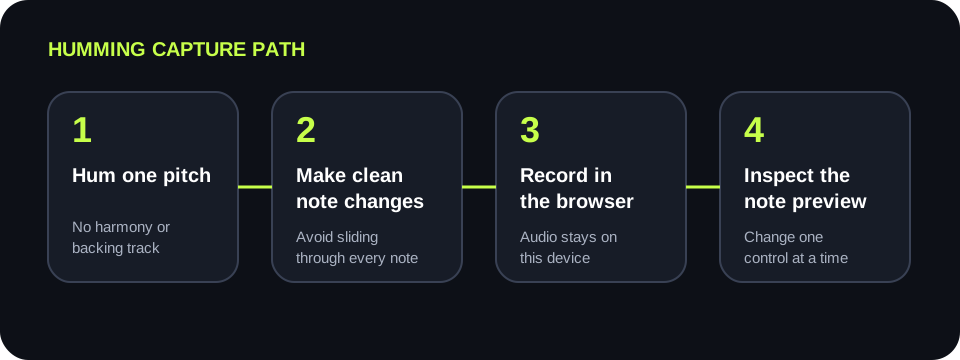
PROCESS ON THIS DEVICE
Use one short phrase for the baseline, then repeat that same phrase when testing a control.
INPUT RECORDING / MP3 / WAV / M4A / FLAC / OGG → OUTPUT .MID
or click to choose audio from your device
MP3, WAV, M4A, FLAC, or OGG · one file · up to 50 MB / 5 minutesRESULT
Your humming stays on your device. All processing happens in this browser. No file is uploaded to a server.
| Visible or audible symptom | Check first | One controlled test | Stop condition |
|---|---|---|---|
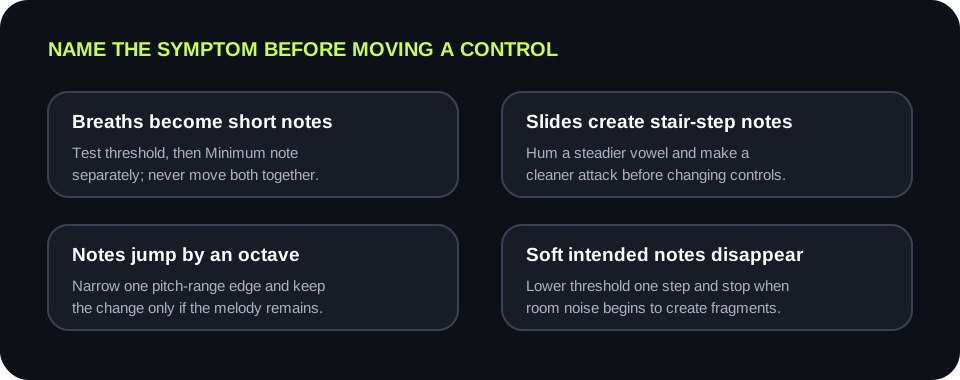
| Breaths become short notes | Match fragments to breaths in the recording | Raise Silence threshold one step | Fragments disappear while soft intended notes remain |
| One slide becomes many notes | Listen for a long glide between targets | Record again with a steadier pitch and cleaner change | The preview shows one block per intended note |
| Notes jump by an octave | Find whether jumps occur on the same hummed pitch | Narrow one pitch-range edge | Jumps disappear without clipping melody notes |
| Quiet notes are missing | Confirm they are audible in the source | Lower Silence threshold one step | The note returns before room noise creates fragments |
| Short fragments remain between notes | Check whether they are briefer than real notes | Raise Minimum note one step | Fragments disappear while intended short notes remain |
SOURCE
The detector estimates one frequency or no frequency for each analysis frame. Chords and doubled voices do not become separate simultaneous MIDI tracks here.
TRANSITIONS
A long glide passes through many intermediate pitches. Hold the vowel steady, then make a deliberate change when the next note begins.
NOISE TEST
Threshold filters quieter frames; Minimum note filters short detected events. Test them separately so the result shows which change mattered.
EVIDENCE
Keep the melody, distance, room, and device fixed. Compare note blocks and audible preview before keeping any control change.
QUICK ANSWERS
Yes. Record or upload a clear single-note hummed melody, convert it in the browser, preview the detected notes, and download the result as a .mid file.
No. The recording or selected file is decoded and analyzed in this browser and is not uploaded to a server.
A slide contains changing pitch over time. Re-record with steadier target notes and clearer transitions before changing the detection controls.
Hold the recording fixed and raise Silence threshold one step. If the unwanted notes are brief rather than quiet, revert and test Minimum note separately.
This page estimates one pitch at each analysis moment, so use one melodic line without harmony or backing music for a result that matches the tool's design.