FILE TYPE
It is note data, not sound
A MIDI file carries events such as note start, note end, velocity, and tempo. A player or instrument generates the audible sound.
OPEN THE RESULT
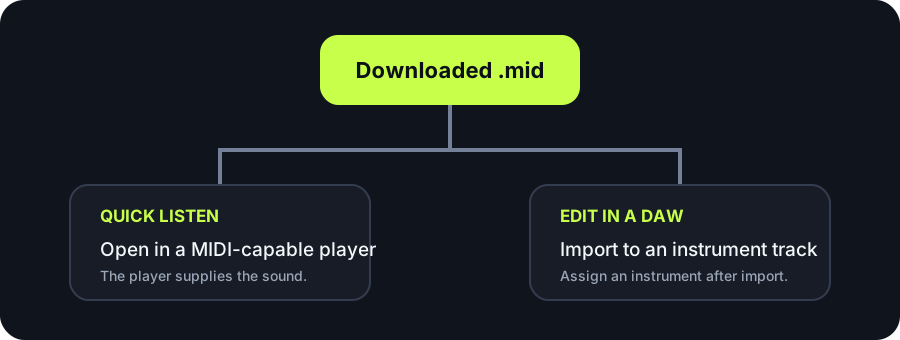
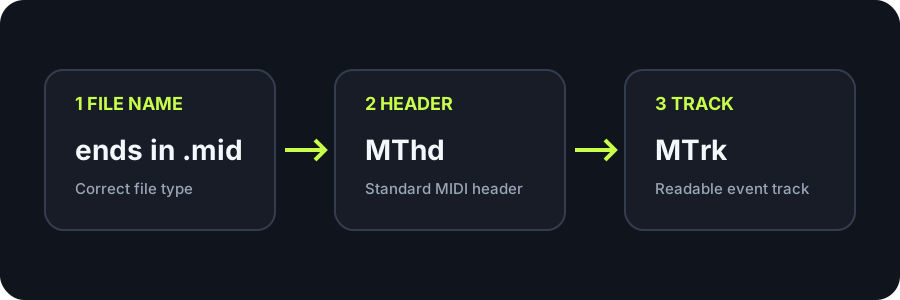
Open a `.mid` file with a MIDI-capable player for a quick listen, or import it into a DAW instrument track to edit the notes. If double-clicking does nothing, the file may still be valid: verify that it ends in `.mid`, then use your app's Import command and assign an instrument.
MAKE A FRESH FILE
Create a new `.mid`, then use the checks below if your destination app does not open it as expected.
INPUT MP3 / WAV / M4A / FLAC / OGG → OUTPUT .MID
or click to choose audio from your device
MP3, WAV, M4A, FLAC, or OGG · one file · up to 50 MB / 5 minutesRESULT
Your audio stays on your device. All processing happens in this browser. No file is uploaded to a server.
| Symptom | What it usually means | Next check | Do you need to reconvert? |
|---|---|---|---|
| No app opens on double-click | The operating system has no default app associated with `.mid` files. | Open a MIDI-capable app first, then choose Open or Import. | No. File association does not change the MIDI data. |
| The DAW rejects the file on an audio track | A MIDI file contains events, not an audio waveform. | Import it into a software-instrument or MIDI track. | No. Change the destination track type. |
| Notes appear but no sound plays | The track has no instrument or its MIDI output is not routed. | Assign an instrument, arm monitoring if needed, and check output routing. | No. The visible notes show that event data was read. |
| The app reports an invalid file | The download may be incomplete, renamed, or altered. | Confirm the `.mid` extension, `MThd` header, and `MTrk` track. | Download a fresh result if an integrity check fails. |
| The file opens at the wrong place or speed | Import position or project tempo differs from the file's intended timing. | Check region start and the destination project's tempo behavior. | No. Align timing before changing detected notes. |
FILE TYPE
A MIDI file carries events such as note start, note end, velocity, and tempo. A player or instrument generates the audible sound.
THIS DOWNLOAD
The current browser tool writes a format-zero Standard MIDI File with one track at 480 ticks per quarter note. The track contains tempo, a track name, note events, and an end marker.
OPEN VS IMPORT
A player may use Open. A DAW often uses Import, then places the events on a MIDI or software-instrument track. Dragging into an audio-only track can fail.
SAFE RETRY
Before editing, keep the original downloaded `.mid`. If an app changes or resaves it, compare against that unchanged copy rather than reconverting the source immediately.
QUICK ANSWERS
Use a MIDI-capable player for listening, or open a DAW and import the `.mid` into a MIDI or software-instrument track for editing.
Your operating system may not have a default MIDI app. Start a compatible player or DAW first and use its Open or Import command.
MIDI does not contain recorded sound. Assign an instrument or MIDI output, then check track monitoring, routing, and volume.
Confirm the `.mid` extension and use a MIDI-aware inspector to verify an `MThd` header and an `MTrk` track chunk. This tool writes both when a conversion result is downloaded.
Not first. Check the destination app, track type, file association, instrument, and file integrity. Reconvert only if the file itself is incomplete or the detected notes need changing.