mp3 to midi
Runs locally in your browser

SAXOPHONE RECORDING WORKFLOW

Saxophone to MIDI

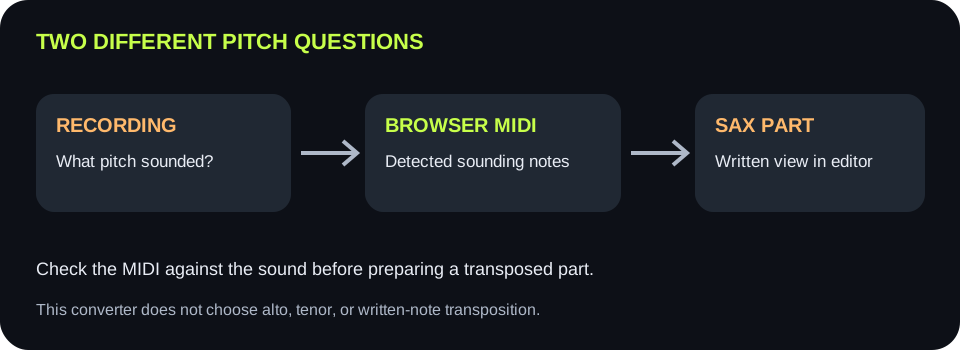
Upload or record a clean solo saxophone line, convert it below, and compare the detected notes with the sound you actually hear. The .mid file follows detected sounding pitch; this tool does not automatically rewrite notes as an E-flat alto or B-flat tenor saxophone part. For a player-ready score, import the MIDI into notation software, choose the correct saxophone instrument, and inspect its written-pitch view before sharing.

PROCESS ON THIS DEVICE

Upload or record one saxophone line

Start with a clear solo take. Preview the detected sounding notes before you prepare a written part in notation software.

INPUT  MP3 / WAV / M4A / FLAC / OGG → OUTPUT  .MID

Drop one audio file here

or click to choose audio from your device

Choose audioMP3, WAV, M4A, FLAC, or OGG · one file · up to 50 MB / 5 minutes
Or record an isolated saxophone phrase with your microphone.

Your saxophone recording stays on your device. All processing happens in this browser. No file is uploaded to a server.

No sign-upOne file at a timeNo watermark

CONTROLLED SIGNAL CHECK

What one browser test actually showed

A locally generated WAV contained two harmonic pitched tones with fundamentals at 440 Hz and 493.88 Hz, separated by silence. At the displayed defaults, this page completed conversion and showed two notes in MIDI range 69–71. No saxophone type was selected and no written-part transposition was applied. This is a synthetic software-path test, not a real saxophone accuracy result.

BEFORE EXPORT

Match the recording first

The analysis reads frequencies from the audio and converts them into MIDI note numbers. It does not inspect the saxophone's name, key, or fingering. Check the note preview against the recording as a sounding-pitch comparison, not against a transposed printed part.

AFTER EXPORT

Make the written part in a score editor

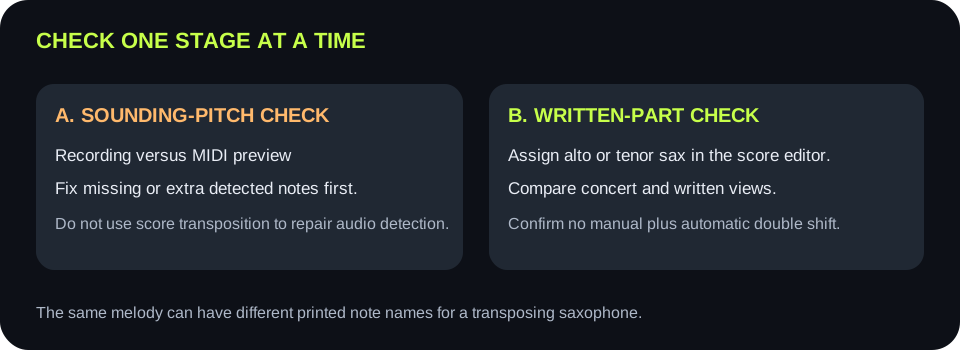
Import the downloaded MIDI, assign the appropriate saxophone instrument, and use the editor's concert-pitch or written-pitch display to inspect the result. Do not also shift all MIDI notes by hand unless you have verified what the editor already transposes.

Recorded saxophone sound becomes detected sounding-pitch MIDI, then a notation editor displays a transposed saxophone written part
The conversion stage follows audio pitch. The notation stage handles instrument-specific written pitch.
Your next useWhat to keep or setWhat to verify
Play the result beside the sourceKeep the detected MIDI at sounding pitchCompare audible note centers and timing with the original recording
Edit the melody in a DAWImport the .mid as note events and assign an instrumentThe instrument plays the melody in the intended sounding range
Give an alto sax player a partChoose the editor's E-flat alto saxophone instrumentCheck both concert and written-pitch views; do not transpose twice
Give a tenor sax player a partChoose the editor's B-flat tenor saxophone instrumentCheck both views and the sounding octave before export or print
Preview shows wrong notes alreadyFix source or detection first; do not treat notation transposition as a repairThe sounding MIDI matches the solo recording before preparing a part
Two-view quality check: first compare detected MIDI with recorded sounding pitch, then inspect written saxophone notation in a score editor
First settle the audio-to-MIDI result. Only then check how a score editor displays that same music for a saxophone player.

INSTRUMENT FACT

Alto and tenor parts are not written like piano parts

Yamaha's saxophone guide identifies alto as an E-flat instrument and tenor as a B-flat instrument: a written C produces a different sounding pitch on each. The exact octave also matters, so choose the actual instrument in a score editor rather than adjusting by a guessed number of semitones.

CODE CHECK

This MIDI writer adds no sax transposition

The shared script estimates frequency from the recording, rounds it to a MIDI note number, and writes note-on and note-off events. It has no alto/tenor selector or transpose step. The preview and download therefore represent the detected sound, subject to any pitch-detection errors.

SOURCE CHECK

Use one exposed line

A band mix or doubled sax parts can contain several simultaneous pitches. This local detector chooses one pitch per analysis frame; use a solo track or isolated stem before expecting a clear single-line MIDI result.

EDITOR CHECK

Compare both notation views

MuseScore Studio documents concert pitch as the actual sound and written pitch as the instrument's notated part. Its instrument setting can apply the transposition automatically. Keep a copy of the unaltered MIDI and compare sound, concert view, and written view before sharing a score.

QUICK ANSWERS

Saxophone-to-MIDI questions

Can I convert a saxophone recording to MIDI here?

Yes, for a clear single-line recording. Choose or record audio, convert in the browser, inspect the result, and download .mid.

Is the download already an alto or tenor saxophone part?

No. It contains detected sounding MIDI notes, not a written saxophone score. Choose the appropriate instrument after importing into notation software.

Why do printed sax notes differ from the MIDI preview?

Saxophones are transposing instruments. A score editor can show written notes for the player while the concert-pitch view matches the sound. Check the editor's instrument and view settings before moving MIDI notes.

Will this separate saxophone harmonies or a band mix?

No. The detector estimates one pitch at a time. Isolate one saxophone melody first.

Does it upload my recording?

No. The audio is decoded, analyzed, previewed, and converted in this browser.

Instrument and notation references: Yamaha's saxophone guide and the MuseScore Studio transposition handbook.